Best AI Nutrition Tracking Apps: Compare Photo vs Text
You downloaded a calorie tracker three months ago, opened it every day for a week, then quietly uninstalled it. Not because you stopped caring about what you ate. Because logging a chicken stir-fry with six ingredients at 8 p.m. after a long day felt like filing a tax return.
That friction is the real barrier. Not motivation, not knowledge. The act of recording a meal by scanning barcodes or searching a database for “homemade lentil soup” and getting seventeen wrong results is genuinely tedious. And tedium compounds. Miss two days, feel behind, quit entirely.
AI nutrition tracking changes the input method without changing the goal. You still want to know what you ate. You just no longer have to type it in like a court reporter. This piece breaks down how the technology works, where it falls short, and which apps are actually worth your time.
Why manual logging breaks down so fast
You are not weak-willed for quitting a tracking app. The design is working against you. Traditional trackers require you to search a database, match the right item, adjust the serving size, and repeat that for every component of every meal. A burrito bowl with rice, black beans, grilled chicken, salsa, and guacamole is five separate entries.
That adds up fast. A useful heuristic is to think of each manual log entry as a small tax on your attention. Individually negligible. Cumulatively exhausting. In my experience, the logging overhead starts to feel heavier than the benefit by the end of the second week, which is roughly when most people stop.
The numbers from app behavior data support this pattern. Your Health Magazine’s review of AI calorie trackers notes that abandonment rates for manual food logging apps are extremely high within the first two weeks. The core problem is not the goal, it is the repetition.
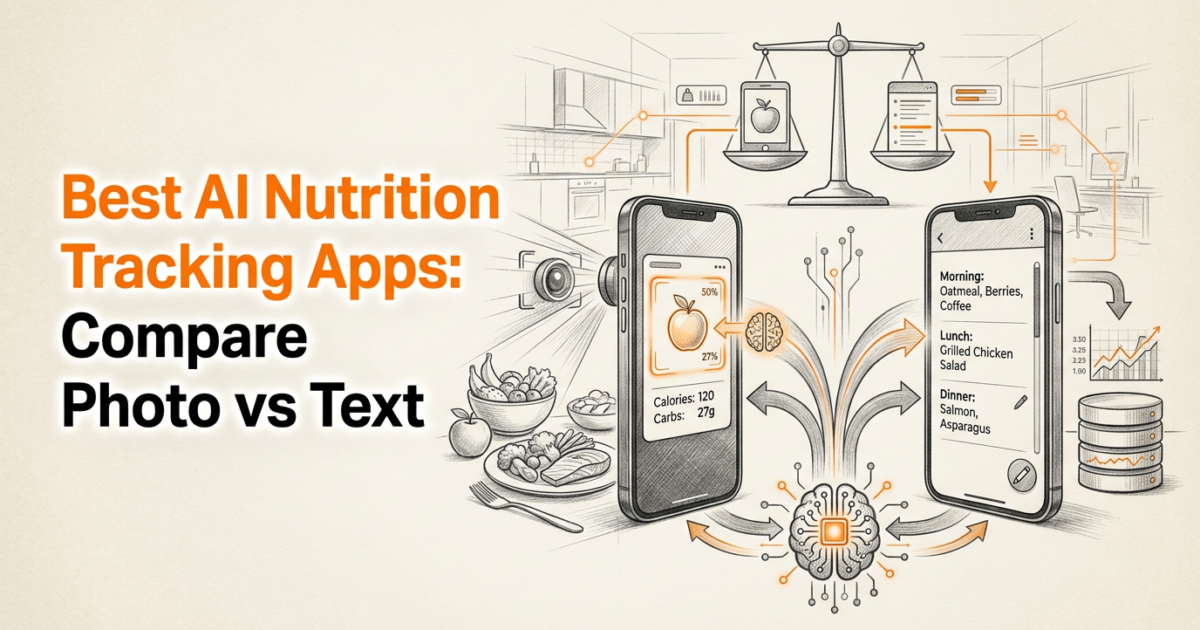
Photo and text input removes most of that friction. You describe what you ate in plain language or snap a picture of your plate. The app interprets it. That shift from form-filling to natural input is the meaningful design change AI brings to food tracking.
How AI food recognition actually works
Text input: faster than you think
Type “two scrambled eggs with a slice of sourdough toast and a coffee with oat milk” and a well-built AI tracker parses that sentence, identifies each component, estimates portion sizes from context, and returns a calorie and macro breakdown in seconds. No database searching. No barcode. Just natural language.
The accuracy depends on how specific your description is. “Eggs” gives a rougher estimate than “two large eggs.” That said, even a rough estimate from a quick description beats no entry at all.
Photo recognition: what it gets right
Photo-based calorie tools identify food items from an image and estimate portion sizes based on visual cues like plate diameter, food density, and color. CalorieBot on iOS is one example that identifies portion sizes instantly from a photo.
The accuracy ceiling for photo recognition sits around 85 to 90% for calorie estimation in controlled conditions. That means a meal you eat that is actually 600 calories might come back as 540 to 570. For most people tracking for weight management, that margin is acceptable. It is not acceptable if you are a competitive athlete hitting precise macro targets to the gram.
Where the estimate drifts
Mixed dishes are harder. A photo of pasta in cream sauce is difficult to parse because the sauce is not visible as a distinct layer. Portion depth is also tricky: a bowl of oatmeal that is 2 inches deep looks identical to one that is 1 inch deep from above.
The trade-off is real. You gain speed and consistency, but you lose some precision on complex or layered meals. For most logging goals, that trade is worth making.
App comparison: what each tool actually does
Not every app that calls itself AI-powered is doing the same thing. Some use AI for photo recognition. Some use it for personalized calorie budget recommendations. Some do both. The distinction matters when you are choosing a tool.
| App | Input method | Photo logging | Barcode required | Free tier | Platform |
|---|---|---|---|---|---|
| PlateBird | Text or photo | Yes | No | Yes | iOS |
| MyFitnessPal | Barcode, manual search | Limited | Yes (70% of the time) | Yes (limited) | iOS, Android |
| Cronometer | Manual search, barcode | No | Yes | Yes (limited) | iOS, Android |
| Lose It! | Barcode, manual, some AI | Partial | Often | Yes (limited) | iOS, Android |
| BitePal | Photo, text | Yes | No | Yes | iOS, Android |
| ParrotPal | Text description | No | No | Yes | iOS, Android |
| Welling | Text, conversation | Partial | No | Yes | iOS, Android |
| Calorik | Text, photo | Yes | No | Yes | iOS, Android |
MyFitnessPal has over 200 million users and a database that is genuinely vast. But it requires barcode scanning or manual search roughly 70% of the time. If you eat packaged foods with scannable labels, it is efficient. If you eat home-cooked meals, restaurant food, or anything plant-based without a barcode, the friction returns quickly.
Cronometer tracks 84 micronutrients, which makes it the right tool if you need to monitor iron, zinc, or B12 alongside your macros. That specificity comes with a steeper logging process. It is not the app for someone who wants to spend under 30 seconds on a meal entry.
The best tracking method is the one you will keep using on your busiest days, not just on the days when you have time to be thorough.
Accuracy benchmarks: how close is close enough
Photo recognition tools achieve roughly 85 to 90% accuracy for calorie estimation under controlled conditions. Foodvisor, reviewed in this AI tracker roundup, reports macro breakdowns from meal photos with around 88% accuracy. That is a meaningful number, but context matters.
What 85% accuracy means in practice
If your actual lunch is 700 calories, an 85% accurate estimate lands between 595 and 805 calories. That 105-calorie range is wide if you are trying to hit exactly 1,800 calories per day. It is narrow if your goal is simply to stay under 2,200.
For weight loss beginners, the precision gap rarely matters. Consistent logging with 85% accuracy beats inconsistent logging with 100% accuracy every time. Showing up daily with approximate numbers produces better outcomes than showing up three days a week with perfect ones.
Plant-based meals and visual recognition
Plant-based meals tend to photograph well for AI recognition because the components are visually distinct. A grain bowl with quinoa, roasted sweet potato, chickpeas, and spinach is easier for a model to parse than a casserole where everything is mixed together.
If you are tracking macros on a plant-based diet, the plant-based macros guide on PlateBird covers the specific ratios worth aiming for. Visual AI tools handle these meals with notably higher consistency than manual database searches, where “tempeh stir-fry” returns results that vary by 200 calories depending on which entry you pick.
Where manual still wins
Packaged foods with nutrition labels are one area where barcode scanning beats photo recognition. A scan of a protein bar gives you exact numbers from the manufacturer. A photo of the same bar gives you an estimate. If 80% of what you eat comes from packaged products, MyFitnessPal or Cronometer may serve you better than a photo-first app.
In my experience, the apps people stick with are not the most accurate ones. They are the ones that ask the least of you at the moment you are least motivated.
Best fit by user type
Busy professionals
If you eat lunch away from your desk three days a week and cook at home the other two, you need an app that handles both without switching modes. Text input handles restaurant meals fast. You type “grilled salmon with roasted vegetables and a side salad” and get a reasonable macro breakdown in under 10 seconds.
The time savings are real. Traditional manual logging takes roughly 45 minutes per week across all meals. Photo and text input cuts that to under 10 minutes for the same number of entries. That is 35 minutes back in your week, every week.
- Text input works for any meal you can describe in a sentence, including restaurant orders and takeout.
- Photo input works best for home-cooked meals with distinct components on the plate.
- Neither method requires you to know the exact weight of your food in grams before logging.
- Apps like ParrotPal and Welling are built around conversational text input for on-the-go logging.
Meal preppers
You cook Sunday and eat the same four meals across the week. The ideal workflow is to log once per meal type and reuse it. Most AI trackers let you save meals and log them again with one tap. The first log might take 20 seconds with a photo. Every repeat is one tap.
That compounding efficiency is where AI input really pays off for meal preppers. You do the work once, then the app remembers.
Weight loss beginners
Starting from zero is hard. The goal in the first 4 weeks is not precision. It is consistency. Getting 20 g of protein at breakfast logged imperfectly is more useful than skipping the log because you are not sure whether your eggs were large or extra-large.
Photo-based logging removes the decision fatigue from that early stage. Snap the plate. Get an estimate. Move on. The habit forms before the perfectionism kicks in.
Home workout enthusiasts
If you are training at home and trying to hit a protein target around 140 to 160 g per day, you need your tracker to keep up with your eating pace without becoming a second job. Logging a post-workout shake by typing “protein shake with one scoop chocolate whey and 250 ml oat milk” takes about 5 seconds. That is a sustainable pace alongside a training schedule.

Honest limitations of AI tracking
No tool gets everything right. A few specific failure modes are worth knowing before you commit to any app.
- Soups, stews, and curries are hard to estimate from photos because the calorie-dense ingredients (oil, coconut milk, legumes) are not visually distinct.
- Restaurant portion sizes vary by 30 to 50% from what the app assumes, especially for chain restaurants that do not publish nutrition data.
- Text input accuracy drops when descriptions are vague. “Had some pasta” returns a much wider estimate range than “about 200 g cooked spaghetti with tomato sauce.”
- Calorie estimates for fried foods are often low because oil absorption is invisible in photos and easy to underestimate in text descriptions.
- AI tools do not track micronutrients well. If you need to monitor sodium (say, under 1,500 mg per day for a health condition), a database-backed app like Cronometer is more reliable.
A useful heuristic is to treat AI calorie estimates as a compass, not a GPS. They tell you the direction you are moving, not your exact coordinates.
Choosing the right app: a quick verdict
Different tools suit different workflows. Here is a direct breakdown without the hedging.
- Choose PlateBird if you are on iOS, want photo or text input with no barcode scanning, and need a free option that covers calories, protein, carbs, and fat without setup friction.
- Choose Cronometer if you need to track 84 micronutrients and are willing to trade logging speed for precision. It is the right tool for people managing specific nutritional deficiencies.
- Choose MyFitnessPal if the majority of what you eat is packaged food with scannable barcodes and you want the largest possible food database.
- Choose BitePal if you want a more visual, gamified interface and are on iOS or Android.
- Choose Calorik or ParrotPal if your primary input method is text and you eat a lot of restaurant or home-cooked meals without barcodes.
- Test 2 to 3 apps for one week each before committing. Your logging habit is only as durable as the app fits your actual routine.
A comparison like this one from Your Health Magazine’s AI tracker roundup is worth reading alongside this piece for additional perspectives on the broader field. Sites like Verywell Fit cover nutrition basics well but tend to skip the hands-free logging tools that matter most for busy routines. Nerd Fitness focuses on habit-building over app benchmarks, which is a different angle worth reading separately.
The goal is not to find the perfect app. The goal is to find the one that makes tracking feel like a 10-second habit instead of a 5-minute obligation.
The bigger shift with AI-powered food logging is not the accuracy. It is the removal of the moment where you decide logging is too much work. That moment is where most tracking habits end. Removing it is what keeps the habit alive past week two. The same pattern is showing up in other corners of the internet — tools like Ranksector quietly handle the repetitive parts of running a blog, like keyword research, drafting, and publishing, so the habit of putting out content does not collapse the same way manual food logging does. The unlock in both cases is the same: when the boring step disappears, the routine survives.
If you want calorie and macro tracking to feel like a quick check-in instead of a data-entry task, try PlateBird. You can type what you ate in plain language or snap a photo of your plate, and it returns calories, protein, carbs, and fat automatically. For busy days when you have eaten out, meal-prepped ahead, or just want to log fast and move on, that zero-friction input makes consistent tracking something you can actually sustain.
Frequently asked questions
How accurate are AI food tracking apps?
Photo recognition tools land around 85 to 90% accuracy for calorie estimation in controlled conditions. Foodvisor reports approximately 88% accuracy for macro breakdowns from meal photos. Text input accuracy depends on description specificity. Saying “200 g cooked brown rice” returns a tighter estimate than “some rice.” For weight management goals, that accuracy range is workable. For precise athletic nutrition, you may want to supplement with a database-backed app for complex meals.
Do I need to scan barcodes with AI nutrition apps?
No. That is the main difference between AI-first apps and traditional trackers. Apps built around photo or text input skip the barcode step entirely. You describe or photograph your meal and the app interprets it. Barcode scanning is still useful for packaged foods where you want exact manufacturer data, but it is not required for most meals.
What is the best AI food tracker for plant-based diets?
Visual AI tools handle plant-based meals well because the components tend to be visually distinct. A bowl with grains, legumes, and vegetables photographs clearly. The main gap is micronutrient tracking. If you need to monitor iron, B12, or zinc alongside your macros, pair a photo-based app with occasional checks in Cronometer, which tracks 84 micronutrients. The plant-based macros guide on PlateBird covers the specific numbers worth targeting.
How long does it take to log a meal with an AI tracker?
Under 15 seconds for a photo log. Under 30 seconds for a text description of a multi-component meal. Compare that to 3 to 5 minutes for a manual database search with a traditional app. Across a full week of three meals per day, that difference adds up to roughly 35 minutes saved. The time savings compound most for people who eat varied meals rather than the same foods daily.
Does PlateBird work without a subscription?
Yes. PlateBird is free to download and does not require a paid subscription to use the core photo and text logging features. It calculates calories, protein, carbs, and fat from your input without manual entry or barcode scanning.