You know the cycle. You start tracking with good intentions, then the app makes every meal feel like homework. You're hunting for barcode matches, second-guessing database entries, and wondering why a simple lunch has turned into a five-minute research project. A free macro tracker app should make consistency easier, not add another layer of friction.
The issue usually isn't motivation, it's stickiness. The best app is the one you'll still open when you're rushed, tired, eating out, or repeating the same breakfast for the fourth day in a row. That's why this list focuses on what keeps people logging, not just what looks impressive on a feature page.
A lot of free trackers have improved a lot. Leading tools now give you full macronutrient detail, barcode scanning, and richer food databases, and some free tiers go far beyond calorie counting into verified nutrient tracking (Cronometer, MyNetDiary comparison). The bigger question is simpler, though, will the app still feel easy enough to use after the first week?
1. PlateBird
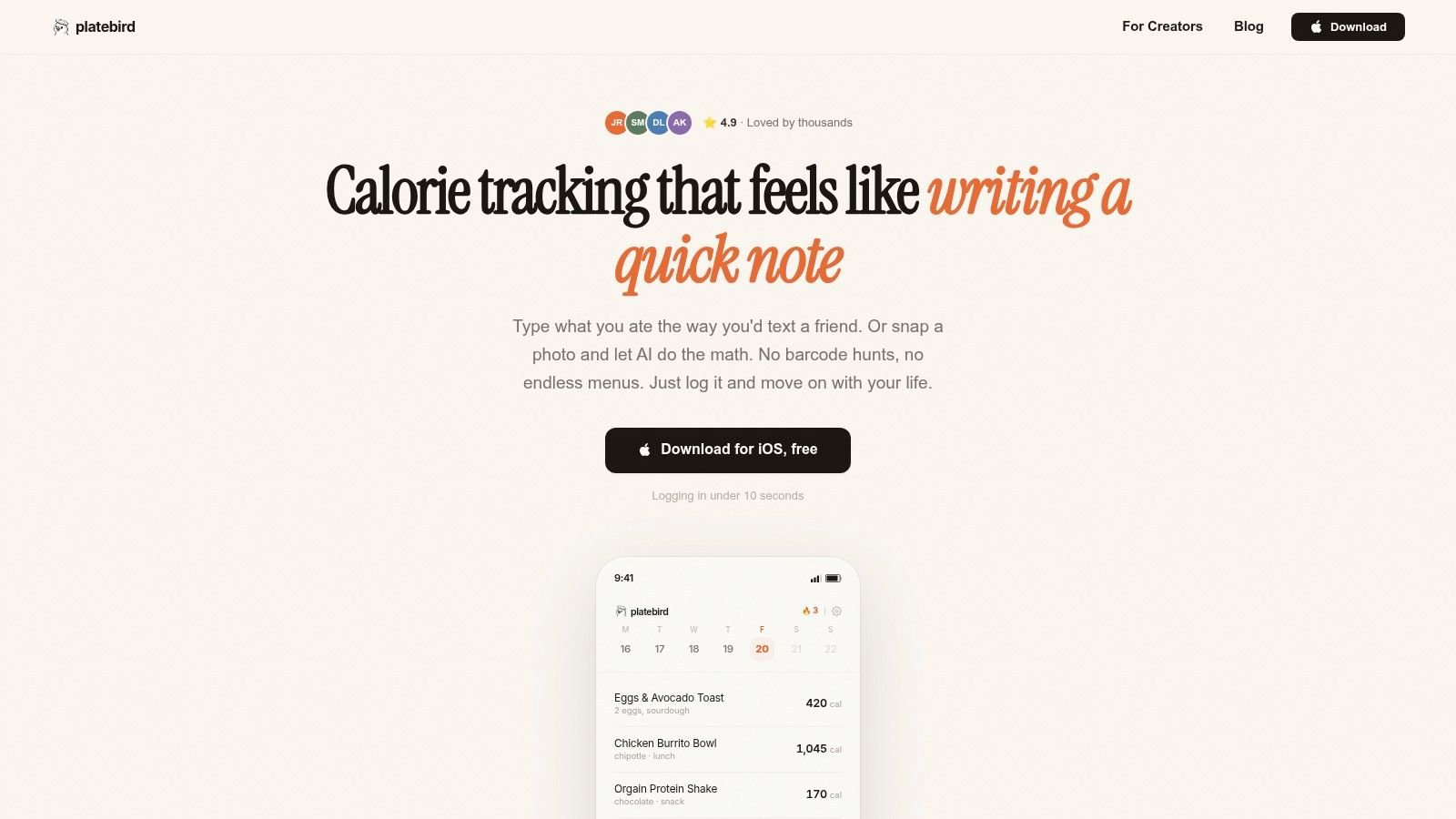
PlateBird stands out because it targets the main reason people stop tracking, friction. Instead of forcing you to work through menus, you can type something casual like “eggs toast coffee” and get a quick nutrition estimate, or snap a photo and let the app identify what is on the plate. That matters on a busy day, because a tool you can use in seconds is much easier to keep using than one that demands perfect input every time.
Why it feels sticky in real life
PlateBird works more like a quick note than a data entry form. It is free to download, requires no account to start, and is built for iOS users who want calorie and macro tracking without the usual setup hassle. The app also learns from repeat meals, so common breakfasts, lunches, and meal-prep recipes can turn into one-tap shortcuts over time.
Practical rule: if logging takes longer than deciding what to eat, the app will lose on busy days.
That is the trade-off with AI-first tracking. PlateBird aims for fast capture first, then enough accuracy to keep you moving. Mixed meals can still need a manual tweak when the plate is complicated, and the app is limited to iOS for now. For a closer look at how PlateBird compares with a more established tracker, see PlateBird vs MyFitnessPal for calorie tracking.
2. MyFitnessPal
MyFitnessPal is the giant first recognized, and for good reason. It's built around a huge food database, macro goals, exercise logging, and a long list of integrations that make it easy to pull in data from the rest of your fitness setup. If you already use wearables or other health apps, that ecosystem reach can make the app feel like the center of your whole tracking system.
The trade-off is that the free version can feel busy. Ads are part of the experience, and several of the deeper analytics tools live behind the paid tier, so beginners can get the basics but may hit friction once they want more detail. For people who care more about database breadth and compatibility than a minimal interface, that's often acceptable.
Best fit and main drawback
MyFitnessPal works best for users who want familiarity and breadth. It's especially useful if you log a lot of branded foods, restaurant items, or recipes and want an app that's widely supported across devices.
- Best for: people who want the biggest ecosystem and don't mind a busier interface.
- Works well when: you value integrations and a massive database over simplicity.
- Gets annoying when: you want a clean, low-friction experience and don't want to bump into paywalls.
For a side-by-side look at how PlateBird approaches the same problem differently, see PlateBird vs MyFitnessPal for calorie tracking.
3. Cronometer
Cronometer is the app I'd point to when someone says they don't just want macros, they want detail. Its free tier is known for full nutrient visibility, and the product itself emphasizes verified foods and deeper tracking than a casual calorie diary. The app's free version is strong enough that it attracts people who care about precision, not just compliance.
That said, precision has a cost in attention. Cronometer can feel data-dense if you're mainly trying to keep protein high and calories in range without staring at charts all day. For a lot of users, that's the entire trade-off, detail on one side, simplicity on the other.
Where it shines
Cronometer is strongest for people who want to see more than the big three macros. Its verified food approach also makes it appealing if you care about data quality and want less guesswork in the database.
Cronometer is a better fit when you want nutrition data to be reliable enough to learn from, not just enough to fill a daily log.
The free version gives serious value, but some advanced charts and reports still sit behind the Gold plan. If you're the type who checks micronutrients, reviews trends, and wants a tracker that rewards careful use, Cronometer is one of the strongest free macro tracker app choices around. If you want a practical walkthrough of tracking habits, this macro tracking guide is worth a look.
4. Lose It!
Lose It! fits the person who wants to start tracking without feeling buried in menus. The app is easy to pick up, the setup moves quickly, and the overall design keeps the focus on logging instead of teaching you nutrition software first. In real use, that matters more than a long feature list, because the app has to be simple enough that you'll keep opening it on ordinary days, not just on motivated ones.
The free version gives you basic tracking, but some of the features people usually notice first sit behind Premium. For example, the AI-powered Snap It photo logging and custom macro ratios require an upgrade, so the free plan stays closer to straightforward calorie and macro entry than to a full coaching tool. That trade-off is clear: less friction up front, less flexibility once you want finer control.
Good for momentum
Lose It! works for people whose main goal is to build the habit of logging without a lot of setup. The clean layout helps remove hesitation, which is often the main obstacle at the beginning. If the app feels easy to open and easy to understand, you are more likely to use it consistently.
That said, the free plan is not built for users who want detailed macro control from day one. If you care about strict macro targets, the app's value is more about consistency than depth. It gives you enough structure to keep going, but it does not try to compete with the more data-heavy apps in this list.
- Strong point: the app feels friendly rather than technical.
- Weak point: advanced macro control is not part of the free experience.
- Best use case: getting someone from “I should track” to “I logged today.”
If your style is simple and beginner-friendly, Lose It! is one of the easiest free macro tracker app options to stick with.
5. MyNetDiary
MyNetDiary gets attention because the free plan feels more complete than you usually expect from a polished tracker. It gives you ad-free basics, a nutrient view that goes further than many competitors, and a database that is presented as staff-verified in the comparison notes. That matters if you want clean logging without running into a paywall every time you try to use a useful feature.
The app also covers the day-to-day tools people rely on. Barcode scanning, macro goals, water tracking, and activity logging are part of the core experience, so the free version does not feel hollow. In real use, that kind of coverage makes a difference, because you spend less time working around the app and more time just logging your meals.
Why it sticks for routine trackers
MyNetDiary works well for people who want a calmer app without giving up core macro functionality. The interface stays clean, the food data is dependable, and the free tier does not throw as much noise at you as some larger competitors.
A tracker becomes sticky when you trust it enough to stop checking every entry twice.
MyNetDiary earns that trust through consistency. It is not built to turn every log into a coaching moment, and that is part of the appeal. It gives you enough structure to keep your habits going, without adding friction you do not need. If you want a free macro tracker app that you can use every day without much drama, it sits in a strong middle ground.
6. FatSecret
FatSecret does not chase attention the way some bigger apps do, and that is part of its appeal. The free version covers calorie and macro logging, food diary entries, reports, and community groups, so you get enough structure to keep tracking without running straight into a paywall. It also works on both web and mobile, which helps if you log in different places during the day.
That kind of access matters in real use. If you have ever stopped using an app because logging from a laptop felt clunky, or because your phone was not the easiest option at a given moment, FatSecret solves that basic problem better than many trackers.
The community angle
FatSecret has a more social feel than the quieter, stripped-back apps. Badges, streaks, and group features can support accountability, especially if you stick with an app more easily when other people are part of the routine.
The trade-off is clear. It is practical and easy to keep around, but it does not go as far with advanced planning tools, and the paid side is where deeper features live. That makes it a fit for people who want a steady tracker first and a bigger coaching system second.
- Useful when: you want web and mobile access with simple tracking.
- Helps with: lightweight accountability and routine use.
- Limits: deeper planning tools stay on the paid side.
If you care more about showing up consistently than about fancy analytics, FatSecret is a free macro tracker app that stays useful without asking you to change how you work.
7. Carb Manager
Carb Manager is obvious territory if you're low-carb or keto, but it still works for general macro tracking. Its strength is focus. Instead of trying to be everything to everyone, it doubles down on carb-aware logging, recipe content, and a community built around that way of eating. That specialization is why it remains a favorite for people with a specific diet style.
The downside is predictability. Apps that specialize often deliver a better experience for their niche and a less polished one outside it. If you're not low-carb, some of the smartest parts of the app may feel less relevant than they do to someone tracking keto closely.
Best for a specific diet style
Carb Manager makes the most sense if carbs are the number you care about most. For people doing keto, low-carb cutting, or carb cycling, that extra emphasis can make the app feel more aligned with the way they eat.
If your diet has a clear rule set, an app built around that rule set usually feels easier to keep using.
The free version gets you started, but many of the more advanced tools are reserved for Premium. That's the usual trade-off with specialized apps, the free tier gives you the doorway, and the paid tier gives you the deeper structure. As a free macro tracker app, Carb Manager is strongest when your diet is already fairly defined.
8. MacrosFirst
MacrosFirst suits people who want macro logging to stay quick and direct. The app keeps the interface light, and its free tier gives you more macro-centered utility than some larger apps leave open. That makes it feel practical for anyone who wants to log a meal, check the numbers, and get back to the rest of the day without extra taps.
The appeal is how little friction it adds. If you already know your targets, an app should help you confirm a meal quickly instead of making you work for basic entries. MacrosFirst keeps that workflow tight, which is a big part of why a free macro tracker app only sticks when daily use feels easy.
A better fit for users who already track with intent
MacrosFirst makes the most sense for lifters, body recomposition goals, and anyone who wants macros to stay at the center of the app. It works well for people who do not want a nutrition app that keeps turning into a recipe hub, a wellness feed, or a lifestyle platform.
- Fast: fewer steps between food and log.
- Focused: built around macro awareness, not extra noise.
- Smaller ecosystem: not as broad as the biggest players.
That trade-off is straightforward. You give up some breadth, but you get a cleaner daily routine, and that matters if consistency is the goal. For a closer look at the macro-first approach, see this free macro tracking breakdown.
9. YAZIO
YAZIO is a good match for people who want a modern-looking app and don't mind that many of the richer features sit in the Pro lane. The free version handles calorie and macro logging, weight goals, and basic tracking well enough for everyday use. It feels polished, which helps if you're more likely to stick with an app that looks and feels current.
The flip side is the upsell pressure. Recipes, meal plans, and deeper analytics are mostly part of the paid experience, so free users get a usable tracker but not the full content ecosystem. That's fine if you want a simple logbook, less ideal if you expect built-in guidance.
Simple tracking with a polished feel
YAZIO is best when you want something visually clean and easy to live with. It's not the most generous free tier on the list, but it does cover basic macro tracking without feeling clunky.
Good design doesn't replace functionality, but it can make a daily habit feel less annoying.
That's the main reason YAZIO keeps showing up in roundup lists. It's a decent free macro tracker app for users who value presentation and simple logging, and who don't mind that the app gets more useful after the upgrade.
10. Nutritionix Track
Nutritionix Track fits the kind of day where meals happen between errands, meetings, and takeout orders. Its Nutritionix database gives it strong restaurant and branded-food search, and the natural-language logging keeps entry quick enough that you're less likely to skip a meal because it was hard to type. For anyone who eats mixed meals or logs on the move, that speed matters more than a crowded feature list.
The free tier stays centered on individual tracking. Pro adds coach sharing and a few extras, so the no-cost version is mostly about getting your own log in without extra steps.
Fast logging for restaurant-heavy days
Nutritionix Track works well for lunch counters, delivery apps, and fast food stops where portion sizes are messy and you do not want to build every meal from scratch. Predictive search and quick entry reduce friction, which is often the difference between logging a meal and forgetting it by dinner.
It does not try to compete with bigger apps on community features or coaching tools. That makes it a cleaner fit for people who care more about getting food recorded quickly than about built-in social layers.
- Best strength: fast natural-language entry.
- Best use case: people who eat out frequently.
- Main limitation: fewer community and coaching features than bigger apps.
If your main goal is consistency, Nutritionix Track has a clear practical edge. It is a free macro tracker app that makes sense for restaurant-heavy routines, especially when meals are not neatly measured at home.
Top 10 Free Macro Tracker Apps Comparison
| App | Core features | UX / Quality (★) | Value / Price (💰) | Target audience (👥) | Unique selling point (✨) |
|---|---|---|---|---|---|
| PlateBird 🏆 | Natural‑language typing; photo computer‑vision; one‑tap saved meals | ★4.9/5, ultra‑fast, high satisfaction | 💰 Free to download; no account needed | 👥 Busy people & fitness‑minded | ✨ Instantly parse “eggs toast coffee”; learns meals for one‑tap logging; 🏆 recommended |
| MyFitnessPal | Huge food DB; barcode scan; recipe builder; broad integrations | ★★★★☆, extensive but busy UI | 💰 Freemium (ads/paywall for advanced analytics) | 👥 Users wanting database depth & device sync | ✨ Massive database + wearable/app integrations |
| Cronometer | Calories/macros + full micronutrient tracking; verified foods | ★★★★☆, precision/data‑dense | 💰 Freemium (Gold for advanced charts) | 👥 Nutritionists & micronutrient‑focused users | ✨ Detailed micronutrient analysis & verified entries |
| Lose It! | Simple logging; photo “Snap It” (Premium); fasting (Premium) | ★★★★☆, beginner‑friendly | 💰 Freemium (Premium adds AI & advanced targets) | 👥 Beginners & weight‑loss focused | ✨ Very approachable UI and weight‑loss features |
| MyNetDiary | Staff‑verified DB; barcode; water & activity tracking | ★★★★☆, reliable, clean UI | 💰 Free (ad‑free basics) + Premium automations | 👥 Users who value verified data & ad‑free free tier | ✨ Staff‑verified database; solid free core |
| FatSecret | Food diary, reports, community groups; web + mobile | ★★★★☆, strong free/community feel | 💰 Free + Premium to remove ads & add planning | 👥 Community‑oriented trackers | ✨ Active community, badges/streaks, web access |
| Carb Manager | Carb/keto targets; keto programs & recipes; logging | ★★★★☆, strong for low‑carb | 💰 Freemium (Premium for programs & advanced tools) | 👥 Low‑carb / keto practitioners | ✨ Keto‑focused tools, recipes & community |
| MacrosFirst | Macro‑first interface; fast logging; barcode scan | ★★★★☆, streamlined for macros | 💰 Free core macro features + Premium extras | 👥 Pure macro‑trackers | ✨ Generous free macro tools; very fast logging |
| YAZIO | Calorie/macro logging; meal plans & recipes (Pro) | ★★★★☆, modern UI | 💰 Freemium (Pro for meal plans/analytics) | 👥 Users wanting guided meal plans | ✨ Built‑in meal plans & recipe catalog (Pro) |
| Nutritionix Track | Natural‑language entry; strong restaurant DB; exports | ★★★★☆, fast for eating out | 💰 Free + Track Pro for coach sharing/features | 👥 People who eat out often / restaurant heavy | ✨ Excellent US restaurant coverage & quick NLP logging |
How to Choose Your App and Start Tracking Today
The best app is personal, and the right choice usually comes down to how you live. If speed matters most, choose the app that cuts the most friction, because a tracker you use daily beats a “better” tracker you avoid. If detail matters most, choose the one with verified data and deeper nutrient views, because that gives you more confidence in the numbers you're seeing.
Three questions usually make the decision easier. First, do you want lightning-fast logging like PlateBird, or deeper nutrient detail like Cronometer? Second, do you need a broad ecosystem with lots of devices and services, like MyFitnessPal, or can you live inside one standalone app? Third, does your diet style push you toward a specialist, like Carb Manager for low-carb eating, or do you just want a general tracker that stays out of the way?
The category itself is bigger than many realize. Estimates put global active users at 175 to 200 million in 2026, with North America accounting for about 35% of users and the U.S. at roughly 52 to 58 million active users (global calorie-tracking statistics). That scale matters because it explains why the market now has room for both heavyweight databases and friction-reducing tools built for faster habits.
A lot of free trackers now promise core macro logging, but the difference is whether they keep working once the novelty fades. Some free tiers still limit history, scanning, and deeper nutrient views, while others keep the basics easy enough that you can stay consistent after week one (2026 free macro tracker roundup). That's why stickiness matters more than marketing language.
Start with the app that matches your day-to-day reality, not the app that sounds most impressive. If you're busy and hate logging, go with the least annoying tool. If you love detail, pick the deepest one. If you just need a dependable place to begin, choose one free macro tracker app and keep it simple long enough to build the habit.
PlateBird is built for people who want macro tracking to feel fast enough to repeat every day. If you're tired of barcode hunts and clunky menus, it gives you a cleaner way to log meals, whether you type them in plain English or snap a photo first. Visit PlateBird and see how much easier a free macro tracker app can feel when the friction is gone.