Lunch looked harmless. A sandwich, soup, maybe chips on the side. By late afternoon your rings feel tighter, you're thirsty, and when you try to remember how much sodium you've had today, the whole day blurs together. That's where a good sodium tracker app earns its keep. It turns guesswork into something you can act on before dinner.
The hard part isn't knowing sodium matters. The hard part is tracking it when food comes from packages, takeout bags, restaurant kitchens, and your own stove in the same day. Instead of more nutrition theory, what's often required is a system that's fast enough to use when life is busy and accurate enough to be worth trusting.
Why Track Sodium with an App
Undercounting sodium is common because memory is a bad tracking tool. You remember the pretzels. You forget the deli meat, bread, dressing, broth, sauce, and the handful of crackers while making dinner. A sodium tracker app fixes that problem by putting the number in front of you while the day is still salvageable.
That immediate feedback matters more than people expect. If lunch runs high, you can make dinner simpler. If a frozen meal takes a big chunk of your daily target, you can skip the salty snack later. Pen-and-paper logs can work, but they rarely give you that running total in the moment.
Where apps help most
A dedicated app is useful when you:
- Eat a mix of packaged and prepared foods: Sodium hides in foods that don't taste especially salty.
- Need a daily target: Preset goals keep the day from drifting.
- Benefit from reminders and streaks: Consistency beats occasional perfect logging.
- Want something shareable: Digital logs are easier to review than scattered notes.
One app-based intervention in Black church members used a sodium tracker preset to 1,500 mg and found a 7 mm Hg reduction in systolic blood pressure among participants who logged daily and engaged with the educational parts of the program, according to this study on the My DASH Diet Sodium Tracker App. The practical takeaway is simple. Logging worked when people used the app consistently, not occasionally.
Practical rule: Log right after you eat. Waiting until evening is where accuracy starts to fall apart.
This matters even more if you're managing swelling, blood pressure, or heart failure. If that's your situation, Qaly's advice for heart failure nutrition is a useful companion to app tracking because it connects sodium limits to real food decisions instead of abstract rules.
A sodium tracker app won't make choices for you. It does something better. It shows you the cost of each choice while there's still time to adjust.
Choosing the Right Sodium Tracker App
A sodium tracker app is only useful if the data is good enough and the logging is easy enough that you'll keep using it. Often, the choice is driven by app store screenshots. That's backwards. Start with reliability, then test convenience.
Check the database before you commit
A 2022 study of four popular diet apps found that all of them underestimated sodium intake for most participants, and one app reported zero sodium in more than 10% of cases, which could leave users with a false sense of safety, as described in the Polish Heart Journal paper on sodium assessment in diet apps.
That doesn't mean every app is useless. It means you should test the database yourself.
Try this quick screen:
- Search foods you eat often. Bread, soup, deli turkey, rotisserie chicken, canned beans, restaurant chain items.
- Compare entries. If the same food shows wildly different sodium values, the app needs more scrutiny.
- Check packaged foods manually. Pull a label from your kitchen and see whether the app matches serving size and sodium.
- Look for missing nutrients. If sodium fields are blank or suspiciously low, move on.
Prioritize low-friction entry
Logging has to fit your real life. If entering a meal takes too long, you'll skip the exact meals that matter most.
Good apps usually support a mix of these methods:
- Typed meal entry: Fastest for repeat meals.
- Barcode scanning: Best for packaged foods.
- Saved foods or recent meals: Essential if you eat similar breakfasts or lunches.
- Recipe building: Useful if you cook at home often.
If you want a broader look at what makes food logging practical day to day, this roundup of the best nutrition tracking app options is a helpful comparison point.
Look for goals and export features
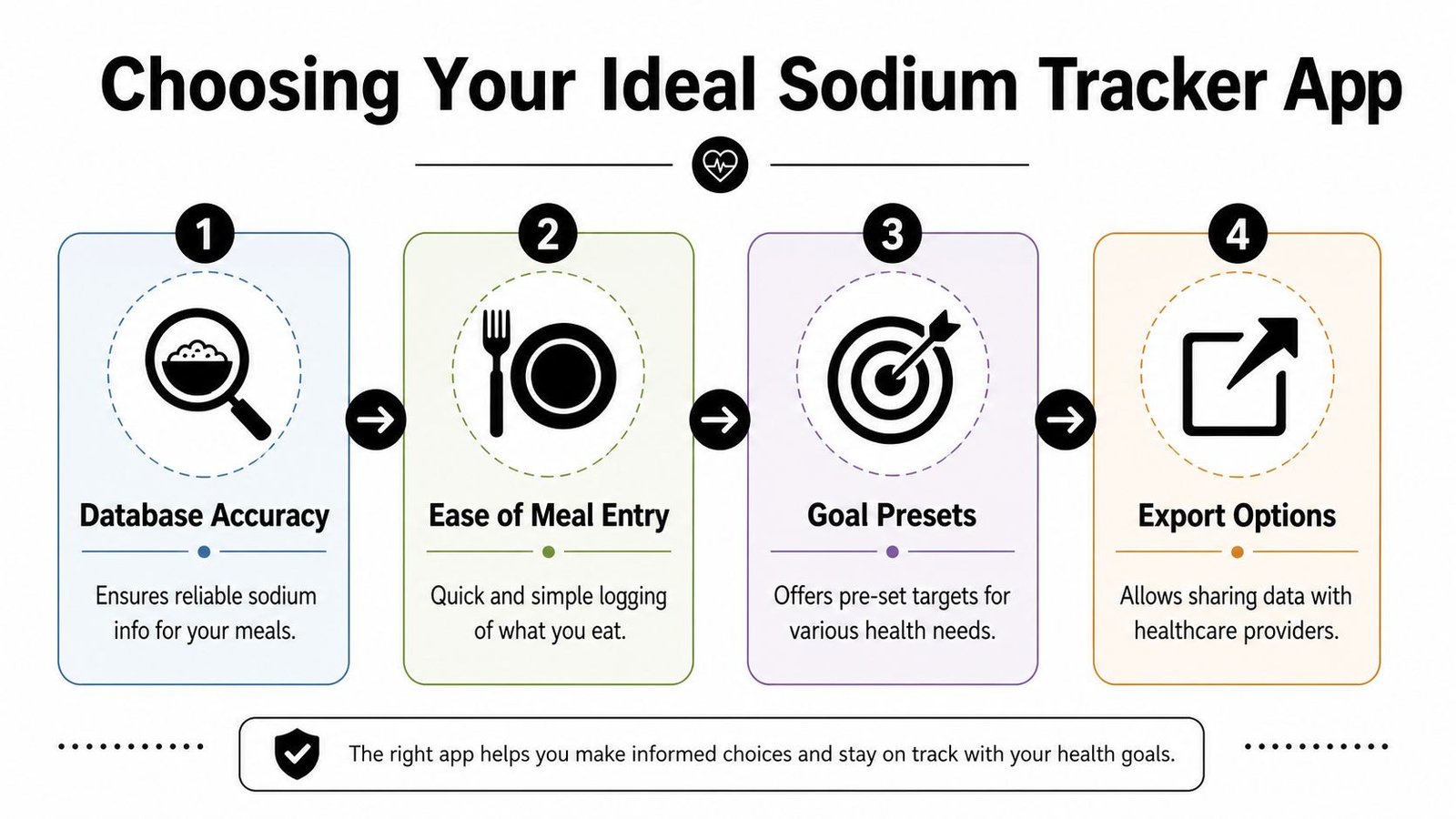
The best app for sodium isn't always the one with the prettiest interface. It's the one that answers four questions clearly:
| Question | What to look for |
|---|---|
| Can it track sodium easily? | Running totals visible from the home screen |
| Can it match your goal? | Custom targets or preset sodium limits |
| Can it handle your meal style? | Restaurant entries, recipes, barcode scans |
| Can you share the data? | PDF export, summaries, or simple reports |
If the app makes you do detective work for every meal, you won't use it long enough for the data to matter.
A good sodium tracker app should feel boring in the best way. Open it, log the meal, check the total, move on.
Setting Sodium Goals and Logging Meals
Once you've picked an app, set it up before your next meal. Don't leave the default settings untouched and hope the app somehow becomes useful later. A sodium tracker app works best when your goal, meal entry method, and saved foods reflect the way you eat.
Set a target you can use daily
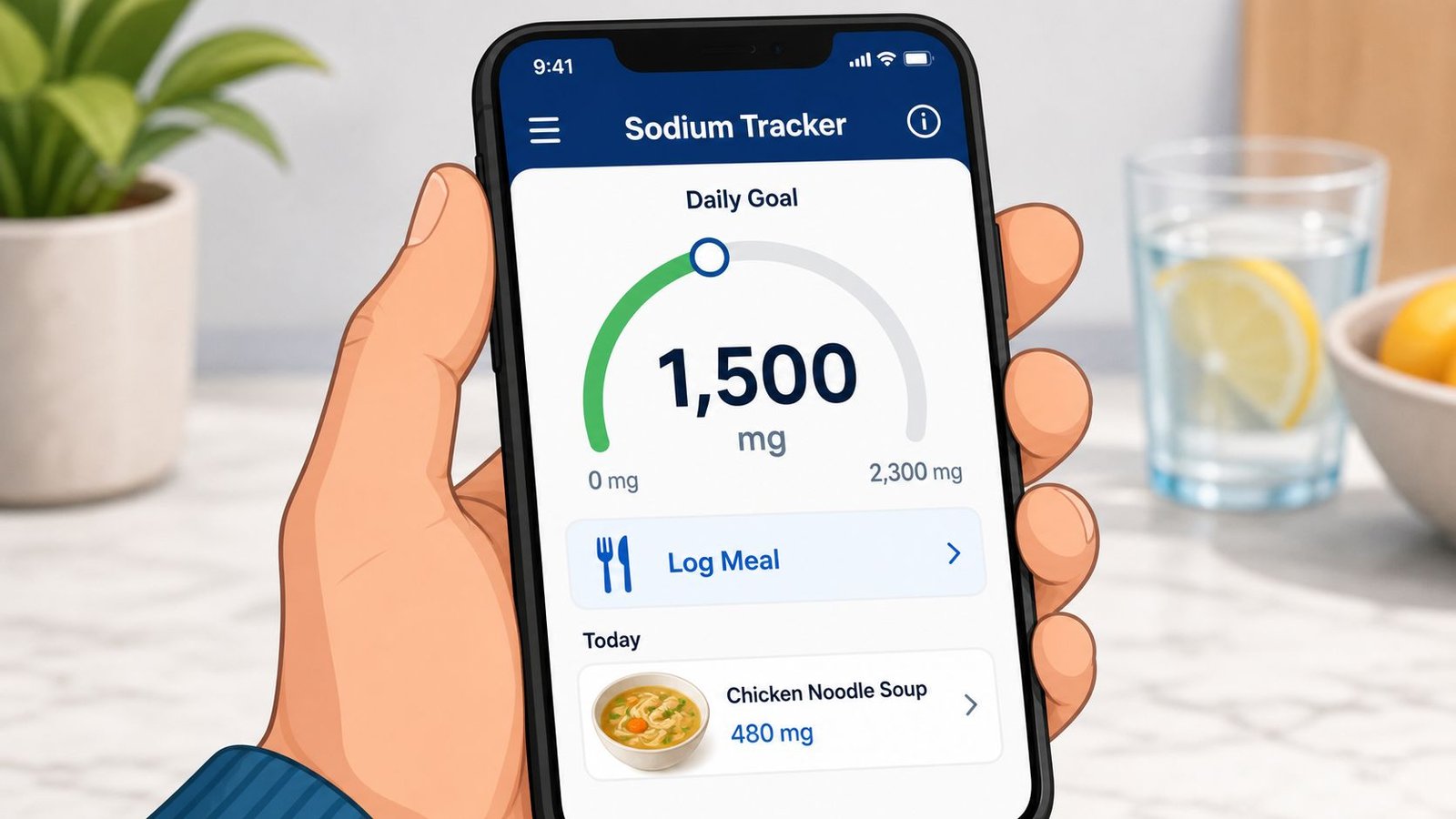
Some people are told to aim for 1,500 mg. Others work with a higher limit such as 2,300 mg depending on their health context. Use the target your clinician gave you. If you haven't been given one, choose the app only after confirming that it allows a custom sodium goal instead of locking you into generic settings.
Then break that goal into meal-level guardrails. Not rigid rules, just practical boundaries. If you spend most of your sodium by lunch, the app becomes a warning system instead of a record of what already happened.
A simple way to stay realistic:
- Breakfast: Keep it modest if you like sandwiches, soups, or takeout later.
- Lunch: Log immediately, especially if there's bread, cheese, sauces, or restaurant food.
- Dinner: Use the running total to decide whether you need a low-sodium reset meal.
- Snacks and drinks: Count them. Sodium sneaks in through crackers, sports drinks, broths, and flavored beverages.
If you're building lower-sodium eating patterns around whole foods, healthy Mediterranean meal planning can help you create meals that are easier to log and easier to keep within target.
Use the right logging method for the meal
Different meals call for different entry methods.
For packaged foods, barcode scanning is usually the quickest route. Still, verify the serving size and sodium field before trusting it. For labels, this guide on how to read nutrition labels helps when the serving math gets confusing.
For restaurant or homemade meals, typed logging often works better than trying to find a perfect match. Break the meal into components. A burrito bowl is rice, chicken, beans, salsa, cheese, dressing. A stir-fry is protein, vegetables, sauce, and added seasonings.
Smartphone apps that combine 24-hour dietary recall with meal photography have shown validated correlation with 24-hour urine sodium excretion, which supports the value of text and photo-based meal logging when used carefully, according to this validation study on smartphone sodium assessment.
Log homemade and restaurant meals with a repeatable method
Use this sequence when no label exists:
- Start with the main item. Chicken breast, pasta, soup, burger, salad.
- Add the sodium drivers. Broth, soy sauce, cheese, cured meat, seasoning blends, pickles, dressings.
- Estimate portion size once, then save it. Use measuring cups, a kitchen scale, or your app's amount selector.
- Create a custom meal. If you order or cook it again, logging becomes much easier.
A visual walkthrough can make the process click faster:
The goal isn't perfect forensic accounting. The goal is consistent, honest logging with enough detail that the trend means something.
Understanding Trends and Health App Integrations
You log carefully for a week, stay close to your sodium target most days, then your blood pressure reading is still up at Friday's check. That is usually the moment people realize daily totals are only part of the job. The pattern across meals, days, symptoms, and readings is what makes the log useful.
Read the chart like a coach would
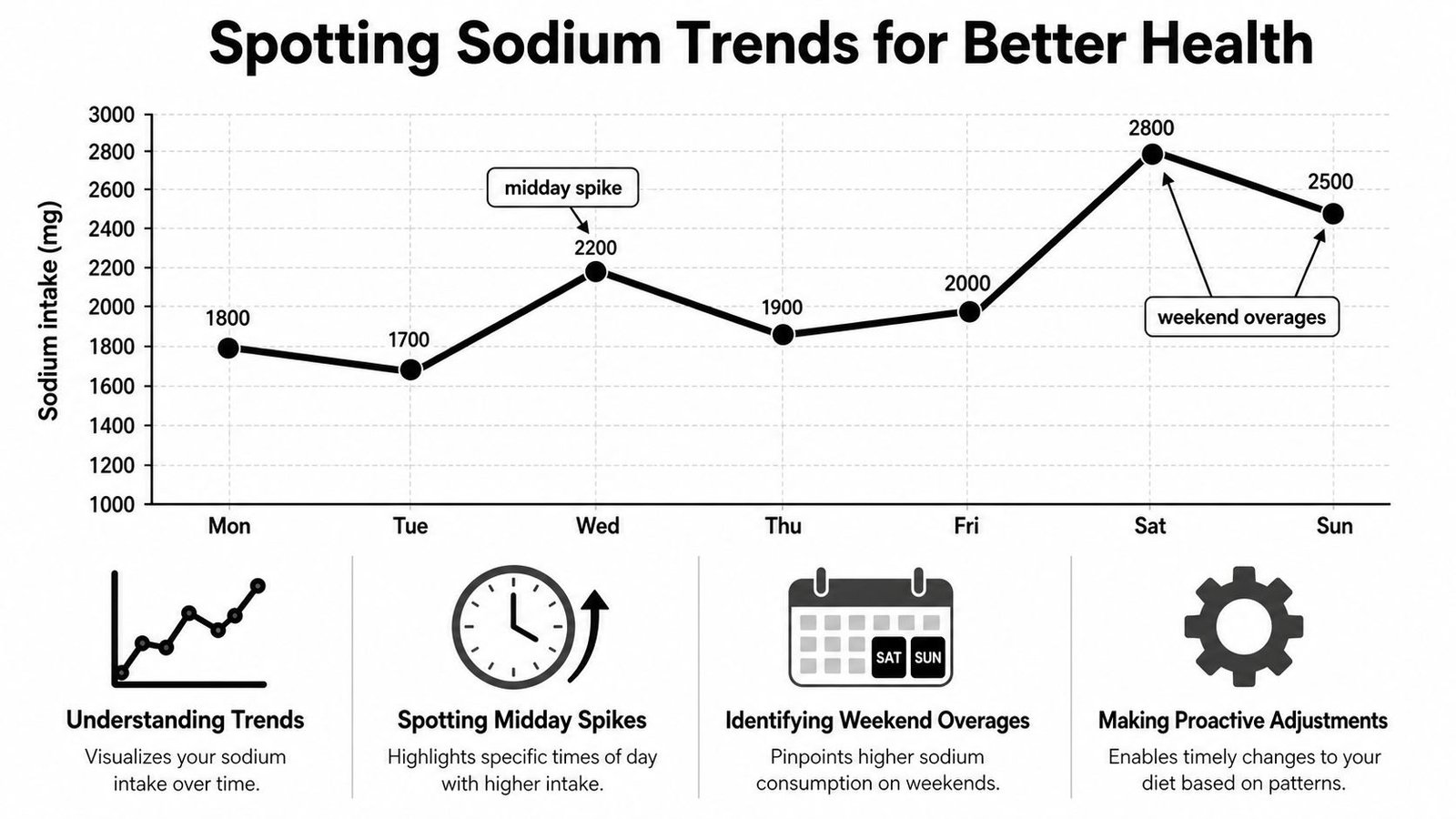
Start with the weekly view, not a single day. A high-sodium dinner on Saturday may not matter much if the rest of the week is stable. A repeated jump every Tuesday lunch is a habit problem you are able to fix.
Review the log with four questions:
- Which meal creates the repeat spike? Restaurant lunches, deli-heavy breakfasts, and convenience dinners are common patterns.
- Which days break your routine? Office days, travel days, and late evenings often change food choices fast.
- Which foods keep showing up on high days? Soups, sauces, breads, cheese, and takeout bowls add up faster than people expect.
- Do symptoms or readings shift with intake? A sodium spike that lines up with higher blood pressure, swelling, or an overnight weight increase deserves attention.
Apps can be particularly helpful when they clearly show trends. A simple 7-day or 30-day chart is often more useful than a crowded dashboard full of nutrient tiles.
Put sodium next to the metrics your clinician actually reviews
For clients managing hypertension, kidney disease, edema, or heart failure, sodium should not sit alone in the app. The useful setup pairs sodium with blood pressure, body weight, symptoms, and activity notes in one place, or at least in one weekly review.
Apple Health and similar platforms can help if your sodium tracker syncs cleanly. Blood pressure may come in from a cuff app, weight from a scale, and step count from your phone or watch. The value is not automation for its own sake. The value is being able to pull up one timeline and ask a practical question: did the higher-sodium stretch match the days your blood pressure or swelling changed?
If your app does not support that view, build it manually once a week. Export the sodium log, add home blood pressure readings, and note symptoms in plain language. “Ankles swollen after restaurant dinner” is more clinically useful than a perfect-looking chart with no context.
A food pattern review also gets easier if you save a few reliable meal options in advance, especially for busy weeks. Keeping a short list of high-protein low-sodium meal ideas can reduce the number of reactive, high-salt choices that later show up as “mystery spikes” in the graph.
Treat app reports as trend tools
App databases vary. User-entered foods are uneven, restaurant entries are often estimates, and homemade meals depend on how carefully the recipe was built. For that reason, I treat the dashboard as a decision tool, not a lab result.
Use the report to answer practical questions. Are overages clustering around takeout? Did your average intake improve after changing breakfast? Are the same two meals causing most of the problem?
A practical weekly review looks like this:
| What to review | What you're looking for |
|---|---|
| Daily sodium totals | Repeat high days and recurring patterns |
| Meal timing and source | Whether restaurant meals, work lunches, or late snacks drive intake |
| Blood pressure and weight | Whether higher-intake periods line up with higher readings or fluid changes |
| Export or summary | A format you can show a clinician without extra explanation |
If your app can export a clean summary, use it. If it cannot, screenshots plus a simple blood pressure log still give your clinician something concrete to review.
Customizing Tracking for Different Users
A sodium tracker app fails when it asks every user to log the same way. A meal prepper, a traveling sales rep, a parent, and someone trying to manage water retention don't need the same workflow. The trick is to build the app around the meals you repeat most often.
For meal preppers and home cooks
If you batch-cook chili, soup, grain bowls, or chicken and rice, build recipes once and reuse them. The value isn't just convenience. It also locks your sodium estimate to the ingredients you use instead of whatever random database entry appears first.
For homemade meals, keep a short list of your major sodium contributors:
- Broths and stocks
- Sauces and marinades
- Seasoning blends
- Canned ingredients
- Cheese and cured meats
Save the finished recipe as a custom meal only after those pieces are included. That turns future logging into a one-tap habit instead of a nightly chore.
For restaurant eaters and busy professionals
This is the biggest gap in the market. Users keep asking for better ways to track sodium in restaurant and homemade meals, and many apps still can't automate it well. AI photo scanning can help, but for unlabeled meals it often leans high for safety rather than giving the breakdown needed for strict medical management, as reflected in user-facing app discussions about restaurant and homemade sodium tracking.
That means busy people need a fallback method that isn't glamorous but works:
- Save your common orders.
- Build meals from components instead of searching for a perfect match.
- Use the restaurant's nutrition data when available.
- When it isn't, choose the closer higher-sodium estimate rather than the optimistic one.
A rough but repeatable method beats restarting from scratch every time you eat out.
If your meals also need to support satiety and muscle goals, these high-protein low-sodium meal ideas can make repeat ordering and meal prep easier.
For parents, athletes, and weight-loss clients
Parents do better with templates. If breakfast rotates between the same few options, save them. If school lunches repeat, build them once. You're not trying to capture novelty. You're trying to reduce friction.
Athletes need context. Some training days change sweat losses and food choices, but that doesn't make the app a free pass for ultra-processed convenience meals. Track what you eat around training, then review whether salty convenience foods are crowding out better options.
For weight-loss clients, sodium tracking can explain scale swings that body fat alone doesn't explain. That keeps people from overreacting to a temporary jump after pizza, takeout, or restaurant meals.
Evaluating Features and Avoiding Pitfalls
A client can log all week, stay under target on paper, then realize Sunday night that the app missed the soy sauce, deli meat, canned soup, and restaurant add-ons that were doing the most damage. That is the problem to screen for before you commit to any sodium tracker app.
A good app does two jobs well. It captures sodium fast enough to use in real life, and it lets you correct the places where estimates usually break down, especially homemade meals, restaurant orders, and records you may want to share with a clinician.
Features that are actually worth checking
Use this checklist before you settle on an app.
| Feature | Why It Matters |
|---|---|
| Custom sodium goal | Matches your clinician's recommendation instead of a generic default |
| Fast meal entry | Makes it more likely you will log while the details are still fresh |
| Barcode scan | Speeds up packaged food logging |
| Custom recipes | Improves homemade meal tracking by letting you enter your real ingredients |
| Saved meals | Cuts repeat work for breakfasts, lunches, and meal prep staples |
| Restaurant search or manual component entry | Gives you a way to log meals that have no package label |
| Trend view | Helps you spot patterns by day, meal, or food type |
| Export or summary | Makes clinical review much easier |
| Editable serving sizes | Lets you correct bad assumptions about portions |
| Notes field | Gives context for blood pressure readings, swelling, travel, takeout, or missed logs |
| Health app integration | Keeps sodium, blood pressure, weight, and related notes closer together for review |
Pitfalls that throw off sodium totals
Some errors matter more than others.
Hidden sodium is the big one. Condiments, broths, seasoning blends, jarred sauces, baking mixes, cheese, cured meats, and canned foods can add more sodium than the main item on the plate.
Bad database entries are another common problem. If a packaged food entry looks suspiciously low, check the label. If a restaurant entry looks too clean or too vague, it probably is.
Restaurant logging also breaks down when the app forces you into generic matches. "Chicken salad" does not tell you whether it included cheese, croutons, dressing, seasoned meat, or a salty side. The better option is an app that lets you enter the meal in parts, then save that order once you have built it.
Homemade meals fail for a different reason. People log the chicken and rice, then forget the broth, marinade, sauce, salt added during cooking, or the actual number of servings the recipe produced. If you cook often, recipe tools are not optional. They are the difference between a guess and a usable estimate.
One practical fix is to leave margin in your day. If your sodium limit is tight, do not plan meals that put you right on the edge by late afternoon. Restaurant meals, leftovers, and recipe entries often have enough uncertainty that a little headroom is safer than trying to hit the exact number.
A practical vetting routine
Test the app for one week before you trust it.
- Day one: Compare several packaged food entries against labels in your kitchen.
- Midweek: Log one restaurant meal the way you order it, with sauces, sides, and substitutions.
- Later that week: Enter one homemade recipe from scratch, including seasonings and serving yield.
- End of week: Review the trend screen and confirm you can export, screenshot, or summarize the data in a way a clinician could review quickly.
If the app makes those jobs clumsy, you will stop using it, or you will start cutting corners. In sodium tracking, those are usually the same outcome.
Next Steps for Consistent Sodium Management
Start with one week of honest tracking. Log meals right after eating, review your running total before dinner, and save any meal you're likely to repeat. At the end of the week, look for the pattern, not perfection.
If you have a clinician involved, keep your sodium log and blood pressure notes together. That turns your app into a practical health record instead of a forgotten food diary. The best sodium tracker app is the one you'll still be using after the novelty wears off.
If you want food logging to feel faster and less tedious, PlateBird is worth a look. It's built for quick typing and photo-based meal capture, which makes it easier to keep the habit going when your day is packed. For anyone who tracks nutrition regularly and wants less friction, that kind of speed matters.