- Why Tracking Often Fails After Day One
- How an AI Calorie Tracker App Actually Works
- Typing, Snapping, and Scanning
- Three Real Ways People Use an AI Calorie Tracker App
- Where AI Calorie Trackers Still Get It Wrong
- How to Choose the Right AI Calorie Tracker App
- A Frictionless Walkthrough With PlateBird
You're standing in the kitchen after dinner, phone in hand, trying to remember whether that bowl had one scoop of rice or two. The food is already gone, your energy is low, and the tracking app wants brand names, serving sizes, and a dozen taps you don't have the patience for. That moment is why so many people stop logging. The problem usually isn't discipline, it's friction.
An ai calorie tracker app exists to cut that friction down to something you'll repeat. Instead of turning every meal into a tiny admin project, it tries to turn the log into a fast glance, a photo, or a short phrase. If you want a reminder that weight loss still rests on the basics, a practical resource like science-based weight loss testing from Cartwright Fitness can help anchor the bigger picture. The tracker is just the daily tool, not the whole strategy.
That shift matters because people don't fail at nutrition tracking from lack of interest. They fail because barcode hunts, portion guessing, and endless menu scrolling make the process feel heavier than the meal itself. Once you see tracking as a friction problem, the category starts to make sense in a new way.
Why Tracking Often Fails After Day One
The first week usually starts with good intentions and ends with a half-filled diary. Someone logs breakfast carefully, then lunch gets delayed, dinner gets guessed, and by the next evening they have already missed two meals. The app did not disappear, the energy did.
Old-school tracking asks you to do too much after you have already eaten. You have to search, compare, weigh, scroll, and second-guess portions while your attention is somewhere else. That is why quick logging matters more than perfect logging, especially if you want to stay consistent long enough to learn patterns.
Friction beats motivation
A better app does not make nutrition magically easier. It removes the small annoyances that stack up. Typing a short meal, snapping a plate, or scanning a package is easier to repeat than reconstructing a meal from memory at 9 p.m. That is the promise of AI-assisted tracking.
The category also fits better with people who want data without turning life into a spreadsheet. If you already use weight loss testing and metabolic guidance as a broader health resource, an AI tracker can sit beside that work and make the day-to-day logging less painful. It is a support tool, not a substitute for judgment.
The rest of this guide answers four simple questions. What the app does, how the technology works, where it still breaks, and how to choose one that does not slow you down.
How an AI Calorie Tracker App Actually Works
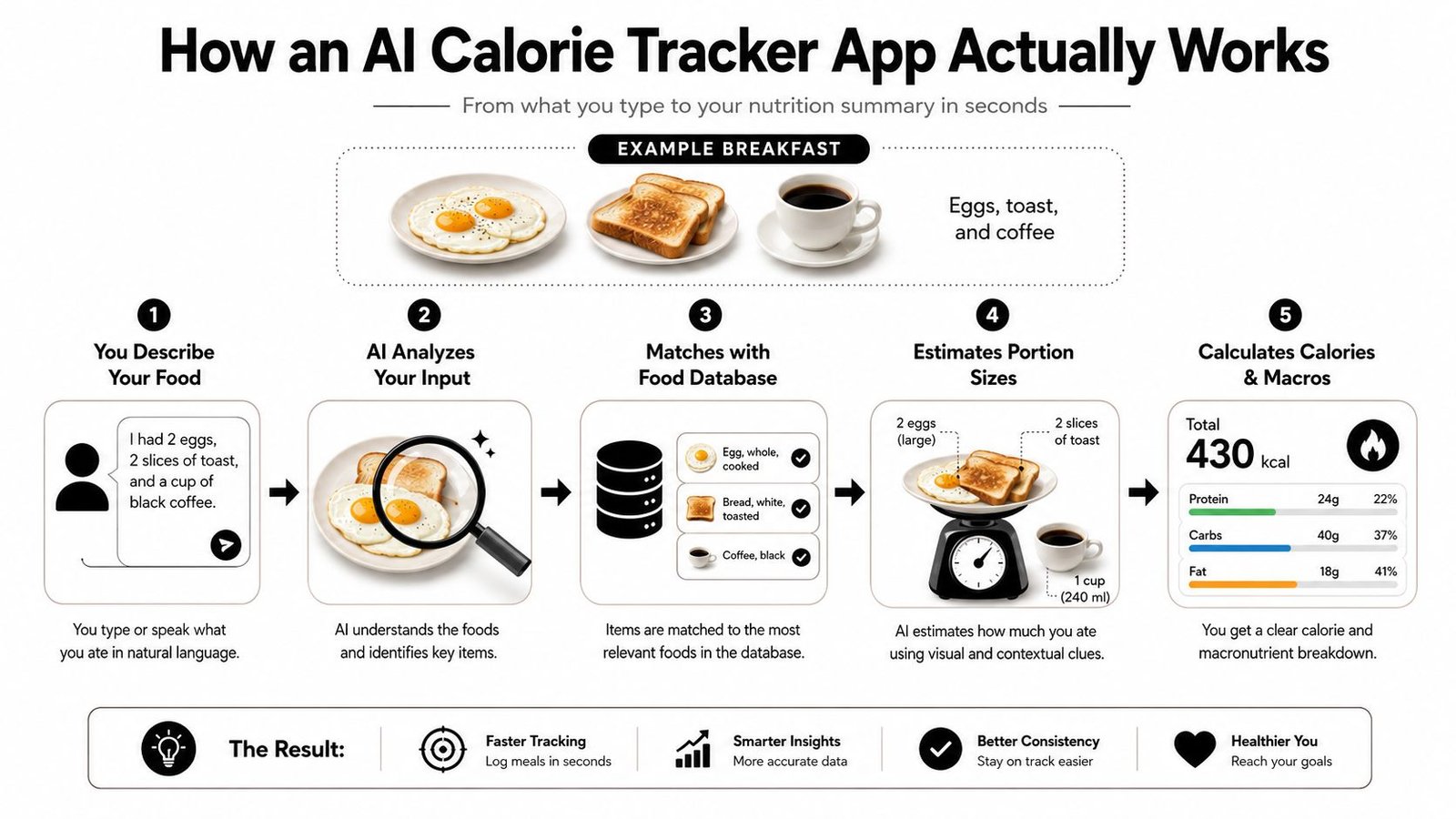
Your breakfast is a good example. You've got eggs, toast, and coffee, and the app has to turn that into numbers fast enough that you'll keep using it. The pipeline is simpler than you'd think, even if the machinery behind it is technical.
Stage one is the input
You start by typing, snapping a photo, or scanning a barcode. In plain English, the app needs a description of the food before it can do anything else. If you type “eggs toast coffee,” the app begins from words. If you photo the plate, it begins from pixels.
That first step matters because it determines how much work you're doing. A typed meal is fast for repeatable foods, a photo is better when the plate is mixed, and a barcode works best when the food comes in a package with a label. For a deeper example of photo-based logging, see PlateBird's photo calorie counter page.
Stage two is recognition
The app then tries to identify what it's looking at. For text, that means natural language processing. For photos, it means computer vision. The goal is to map “toast” to toast, not to bread, and “coffee” to a beverage rather than a generic dark liquid.
That recognition step is where the app starts making guesses. A good model can separate obvious items quickly, but mixed foods, sauces, and toppings make the job harder. If the app doesn't know what's on the plate, the rest of the math is already on shaky ground.
Stage three is the database lookup
Once the app names the food, it matches those names to nutrition data. One open-source implementation describes a setup where computer vision returns food labels and confidence scores, USDA FoodData Central supplies nutrient values, and the app logs the meal after computing portion shares from those labels. That kind of architecture shows the actual job of the app, it's translating a meal into entries from a nutrition database.
If you've ever wondered why two apps can give different numbers for the same plate, this is a big reason. They may recognize the food differently, or pull from different database entries. For readers who like to compare how logging systems are built, Weight Method's TDEE calculator guide is a useful companion reference for understanding energy math more broadly.
Stage four is portion estimation
Most error sneaks in here. The app has to estimate how much food is there, not just what food it is. A plate of eggs and toast can look simple and still hide uncertainty if the bread is thick, the eggs are cooked in butter, or the coffee has milk and sugar.
Practical rule: if the portion matters a lot, give the app more context, not less.
Stage five is the final output
The app shows calories, protein, carbs, fat, and sometimes more detail. That number is only as strong as the weakest step before it. Recognition can be right and portion sizing can still be off, which is why the final output should feel like a useful estimate, not a lab result.
An AI tracker is a fast translator between the food in front of you and the numbers in a database, with a confidence score attached to every guess.
Typing, Snapping, and Scanning
The fastest way to choose an input mode is to match it to the meal in front of you. A typed entry is great when the meal is ordinary and you already know what it is. A photo is better when the plate has multiple items or came from a restaurant. A barcode still wins when you're holding a packaged product with a verified label.
The trade-off is less about “which method is smartest” and more about “which method creates the fewest mistakes in this moment.” If you're home, rushing, and eating something you cook often, typing keeps you moving. If the meal has layers, sauces, or visible uncertainty, a photo gives the app more to work with.
For a hands-on comparison of entry styles, PlateBird's calorie counter app photo guide is a useful reference point.
| Choosing the Right Input Mode | Typical Speed | Best Use Case | Main Weakness |
|---|---|---|---|
| Typed entry | Fastest when meals are familiar | Simple home meals, repeat lunches, meal prep | You have to know what you ate |
| Photo entry | Fast when the plate is visible | Restaurant meals, mixed plates, unfamiliar dishes | Portion size can still be guessed wrong |
| Barcode scan | Fast for packaged food | Snacks, drinks, branded items | Doesn't help with homemade food |
If you want the shortest rule of thumb, use this. Type when you want speed at home, snap when you didn't cook the meal yourself, and scan whenever a package is in your hand. That's the easiest way to keep the app useful without overthinking every log.
Three Real Ways People Use an AI Calorie Tracker App
Maya used to stop tracking by day four because every dinner felt like a chore. Once she switched to a faster app, she started logging every meal in under a minute and could finally look at her weekly average instead of obsessing over one “bad” day. That changed the tone of tracking from punishment to pattern spotting.
Daniel eats the same six lunches on rotation. After the first few logs, he saved each one as a shortcut, so the app turned his meal-prep routine into one tap instead of a fresh search every time. He didn't need a new system, he needed a lighter version of the same system.
Priya lifts four days a week and cares more about protein than perfection. She checks the macro breakdown first, then the calorie number second, because her real question is whether the meal supports training. For her, the app is a filter, not a judge.
The lesson is simple. The right app adapts to your routine instead of forcing you into one. A good ai calorie tracker app can serve a weight-loss beginner, a meal-prepper, and a gym-goer in different ways without making any of them do the same kind of work.
Where AI Calorie Trackers Still Get It Wrong
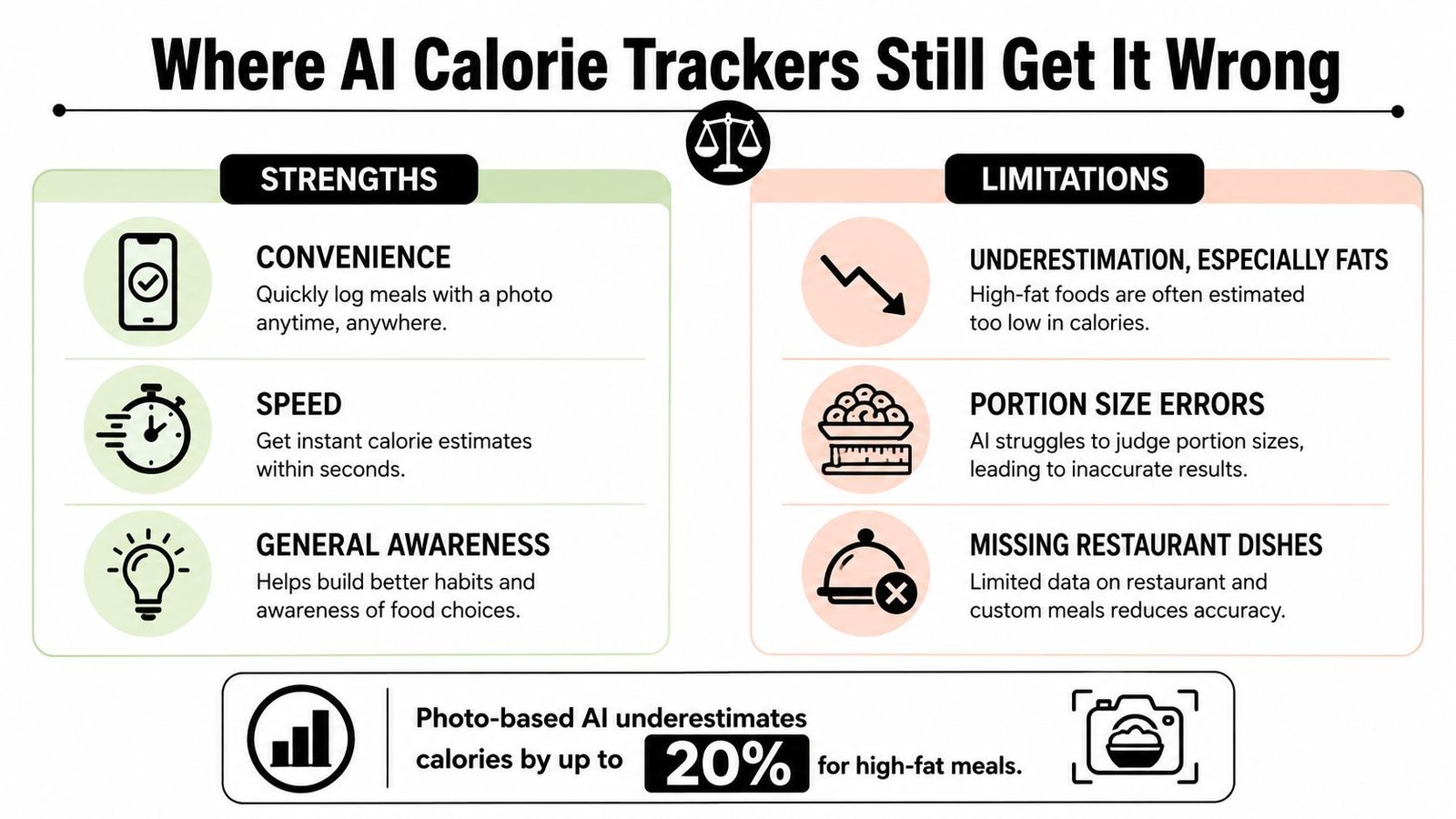
Photo-based AI trackers usually do better than manual logging, but they still stumble on the meals people care about most. The hard cases are mixed dishes, oil-heavy cooking, and restaurant plates where the important ingredients sit under the surface. The app can recognize the food and still miss the calories that matter.
Independent evidence also shows that photo-based apps tend to underestimate calories, especially from fats, so the main error isn't random noise. It's a pattern. That's useful to know because it changes how you should use the app, especially for weight-loss decisions.
Mixed plates are the first trouble spot
A saucy stir-fry can look straightforward to you and still confuse the app. Oil disappears in the shine, seasoning gets flattened into the background, and ingredients blend together before the model can separate them. The workaround is simple, log the base ingredients separately when you can, and add sauces or oils by hand if they matter.
Restaurant bowls hide more than they reveal
A bowl with grains, protein, toppings, and dressing can look clean from above but hide half the meal underneath. The app sees the top layer first, then guesses the rest. If you're eating out, treat the result as directional and use it to stay aware, not to pretend the number is exact.
Homemade recipes can blur the fat content
A curry, stew, or pan sauce may register as the main ingredient while the butter, cream, or oil slips past the camera. That's one reason photo logs can look cleaner than the meal. The easiest fix is to note invisible ingredients in text or enter them manually after the photo.
A quick trust rule helps here. Use the app aggressively for consistency, but be more careful whenever the meal is oily, layered, or cooked by someone else. That's not a flaw of the category, it's the point where trust calibration matters more than speed.
How to Choose the Right AI Calorie Tracker App
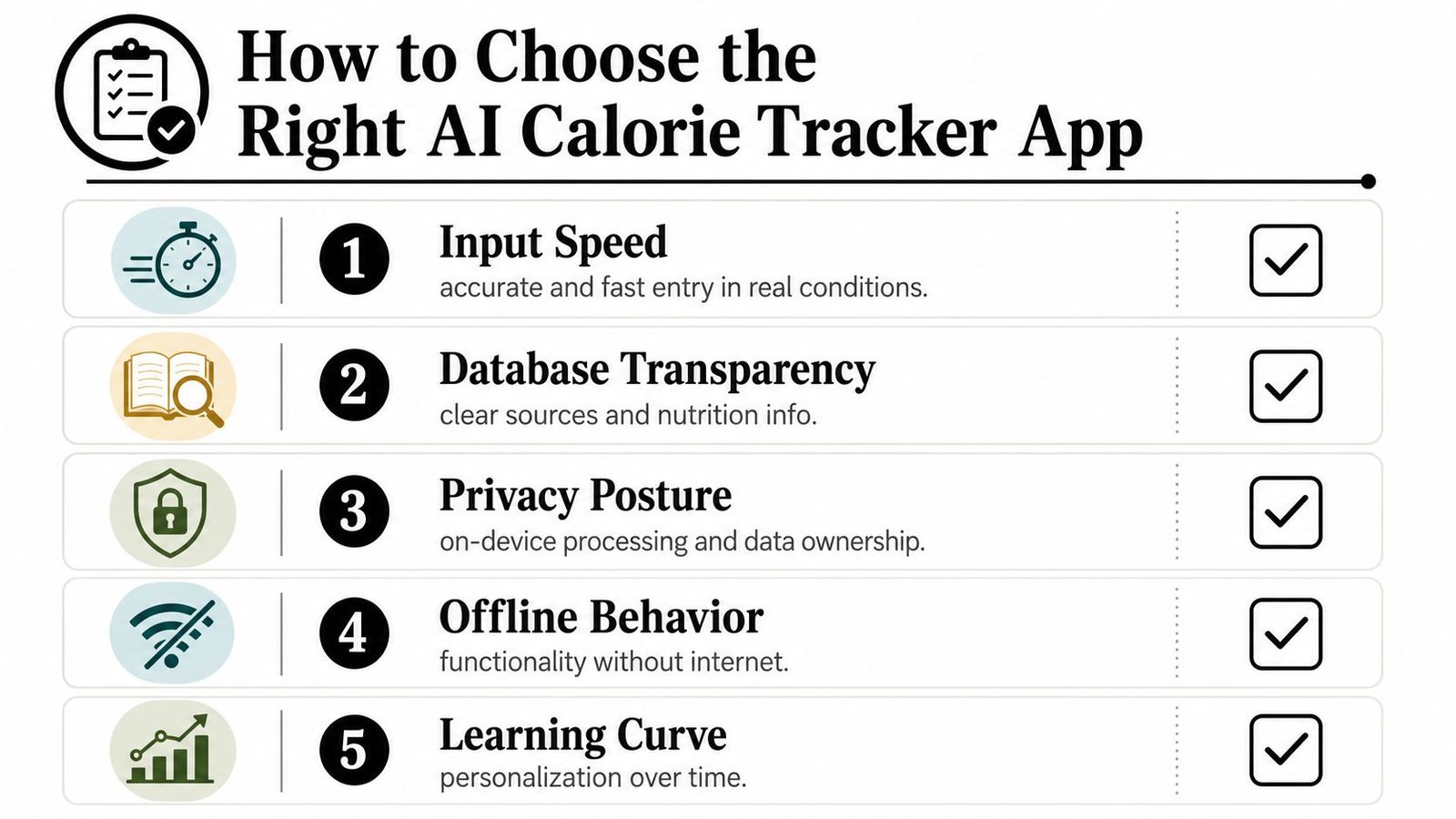
The best choice is the app that fits your actual life, not the app with the loudest marketing. If you're deciding between options, look at five things first, how fast the app feels in real use, whether you can see the nutrition source, how it handles privacy, whether it works when the connection is weak, and whether it learns your repeated meals.
A good filter is simple. Input speed should feel like a meal log, not a mini project. Database transparency should let you understand where the number came from. Privacy posture should tell you what happens to your photos. Offline behavior matters if you log in gyms, kitchens, or places with spotty service. Learning features matter if you eat the same breakfast, lunch, or prep meals every week.
If you're comparing trackers for macros as well as calories, the Strive Workout Log macro guide can help you think about targets before you choose an app. That way you're picking a tool around your habits, not the other way around.
A simple one-week trial
Download one app and use it normally for seven days. Notice where you hesitate, where you correct the app, and where you give up and guess. If the friction costs you more than a few seconds per meal, that app is probably not the right fit for your routine.
If you want a practical shortlist, PlateBird's nutrition tracking app comparison is a useful starting point for comparing features without getting lost in brand noise. The goal isn't to find a perfect tracker, it's to find one you'll keep open.
A Frictionless Walkthrough With PlateBird
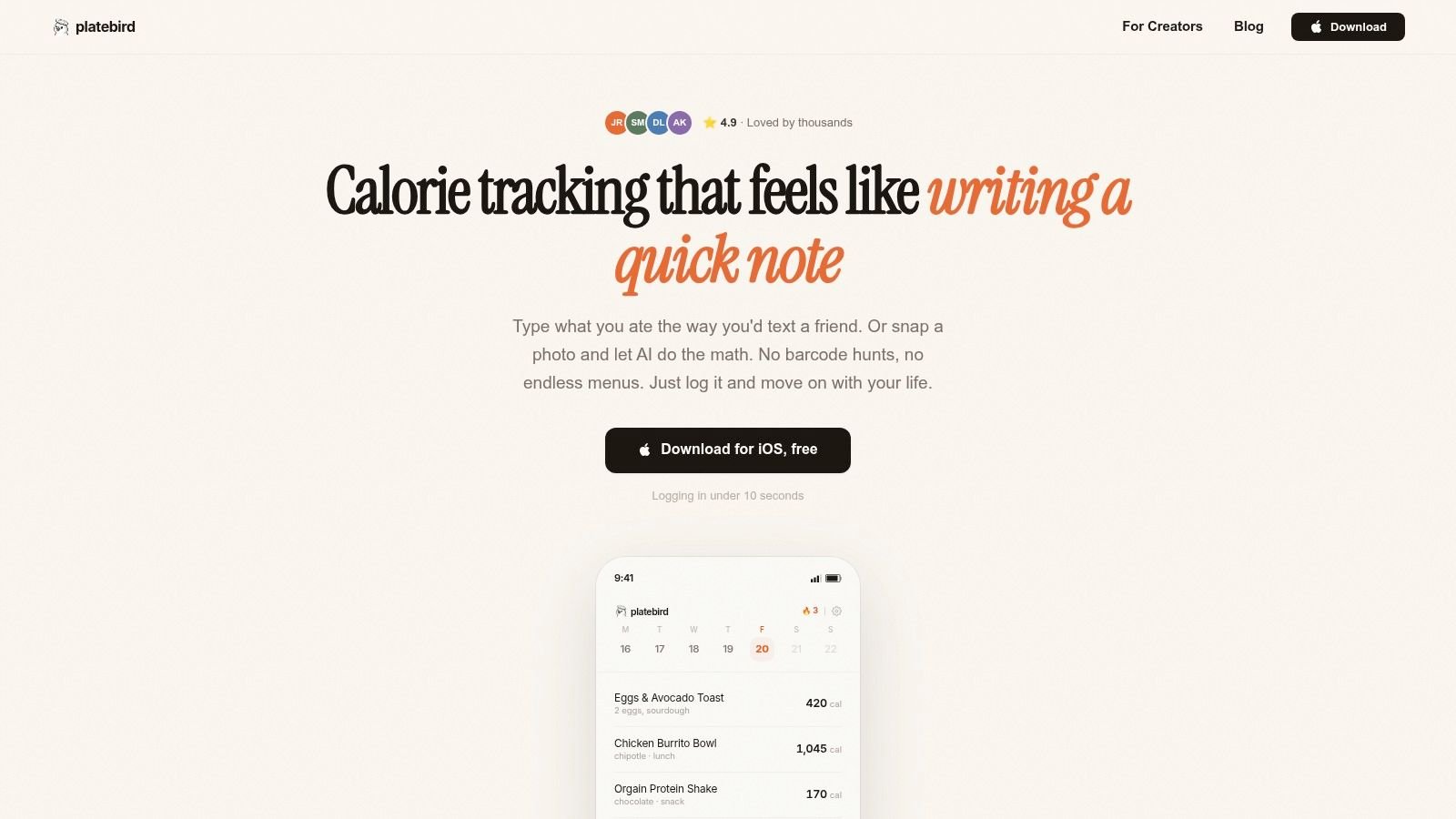
At the kitchen counter, Maya types “eggs toast coffee” into PlateBird before she even sits down. The log appears fast, and she doesn't have to guess whether the app understands a plain-English meal. That feeling matters, because a calm start makes the rest of the day easier to keep up.
Later, she snaps a lunch plate before the first bite. The app reads the meal visually, and the whole interaction feels lighter than searching through menu databases. She can eat without mentally dragging the meal into a spreadsheet first.
By day four, her meal-prep lunch is already saved as a shortcut. She taps it, checks it, and moves on. That's the win, not a flashy feature, but the feeling that logging stopped interrupting her day.
For a quick look at the workflow in motion, this short video shows how the app fits into normal meal moments.
The best tracker disappears into the routine. You stop noticing the app because the input step is no longer the part you dread. That leaves more energy for cooking, training, or eating without interruption.
Consistency beats perfection when the tool stays out of your way.
PlateBird gives you a fast way to log meals with plain text, photos, or barcode scanning, then turns that into calories and macros without making the process feel heavy. If you want an ai calorie tracker app that focuses on low-friction logging and repeat meals, visit PlateBird and see whether the workflow fits the way you already eat.