
You're standing in your kitchen with a plate in one hand and your phone in the other. You want to track lunch. Then the old routine starts. Search for “chicken breast.” Pick the right entry. Was the rice cooked or dry weight? How much oil went into the pan? Is that one cup of broccoli or something closer to two?
A lot of people quit calorie tracking right there. Not because they don't care, but because the process gets annoying fast.
That's why the photo calorie counter feels so appealing. Instead of turning every meal into a tiny accounting project, you take a picture and let the app make an estimate. It's a very modern promise: less friction, more consistency, fewer excuses. Interest in that promise is clearly growing. The global market for calorie counter apps was valued at about $4.8 billion in 2023 and is projected to exceed $14.2 billion by 2033, according to Wondershare's market overview.
The question isn't whether this tech sounds convenient. It does. The question is whether the convenience is worth the trade-off in precision for your goals, your habits, and the way you eat.
The End of Tedious Food Logging
Maya, a busy office worker trying to lose weight, starts Monday strong. Breakfast gets logged. Lunch too. By Wednesday night, she's hunched over her phone typing in every ingredient from a burrito bowl and wondering why tracking food feels like filing taxes.
That's the problem a photo calorie counter tries to solve. It removes the most irritating part of the habit: the searching, the tapping, the portion guessing before you've even taken a bite. For people who are already juggling work, workouts, family meals, and restaurant orders, speed matters more than app polish.
Why this feels so attractive
Manual logging asks a lot from you at the exact moment you're most likely to skip it. You're hungry, distracted, or in a rush. A camera-first app lowers that barrier. Snap the plate. Get an estimate. Move on with your day.
That doesn't mean the estimate is perfect. It means the action becomes easy enough to repeat. And repeated action is what turns food tracking from a short-lived burst of motivation into an actual routine.
The hidden enemy of calorie tracking isn't always inaccuracy. Often, it's friction.
Where photo logging fits into real nutrition goals
For a lot of people, tracking isn't just about calories. It's also about protein, carbs, and fat. If you're trying to understand how those pieces work together, this guide to strategic macro nutrition for weight loss gives useful context beyond the app itself.
A good photo counter doesn't replace your judgment. It gives you a faster starting point. That's especially helpful when your goal is behavior change, not lab-grade measurement.
Here's the practical appeal in plain language:
- Less hunting: You don't have to scroll through dozens of near-identical food entries.
- Less dropout risk: Logging one meal with a photo feels smaller than building it item by item.
- More usable on busy days: The method works when you're eating takeout at your desk or dinner on the go.
For many people, that's enough reason to give it a shot.
How a Photo Magically Becomes Nutrition Data
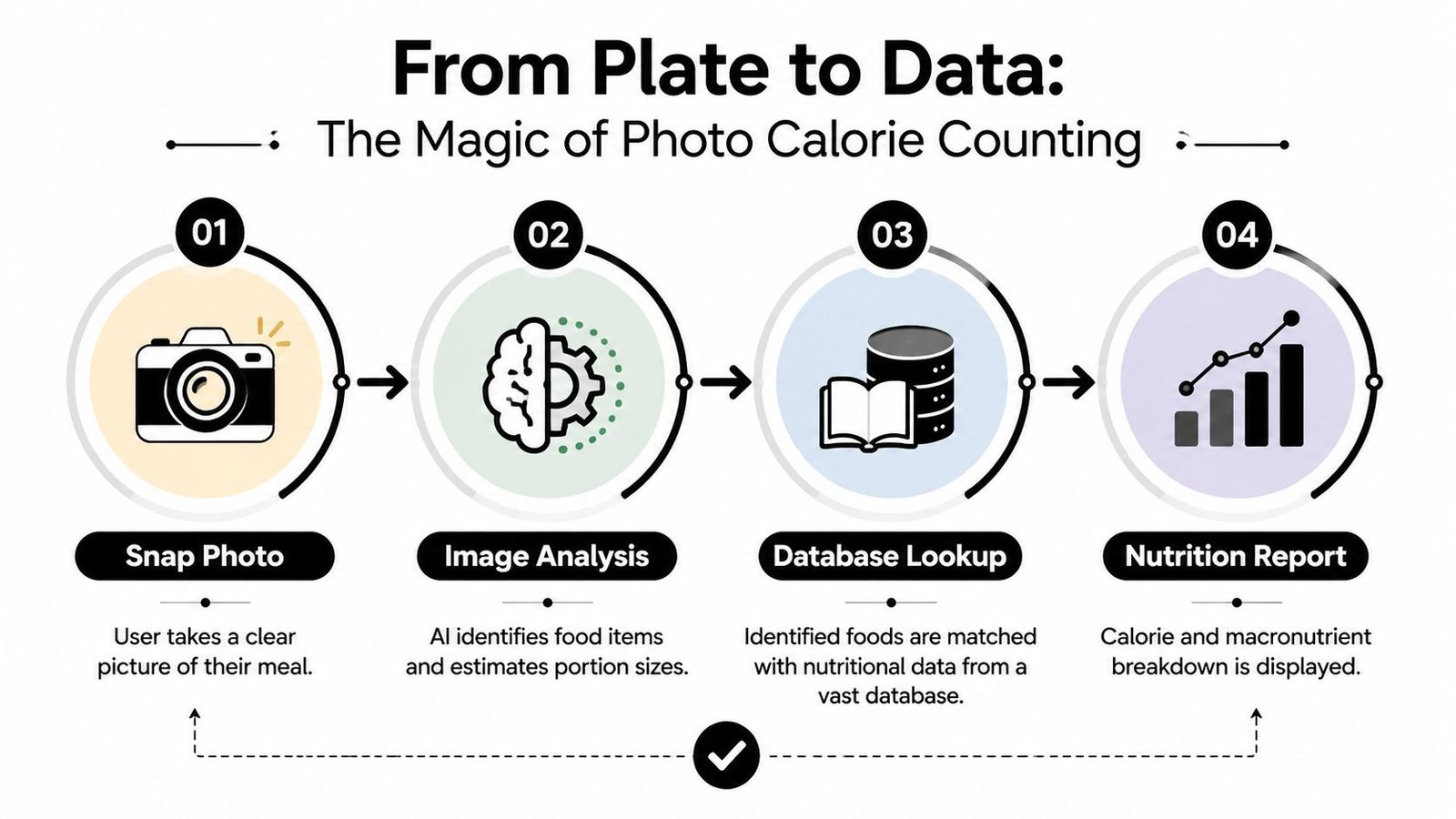
At first glance, a photo calorie counter can seem a little absurd. You point a camera at pasta, and a few seconds later your phone claims it knows calories and macros. It's not magic. It's a chain of small guesses stacked together.
A digital food detective, it studies the scene, identifies what's on the plate, estimates how much of each item it sees, and then checks a nutrition library to build a report.
Step one is recognition
The app starts with computer vision. That's the part that looks at shapes, colors, textures, and patterns and says, “This looks like grilled chicken. That looks like white rice. Those green pieces are probably broccoli.”
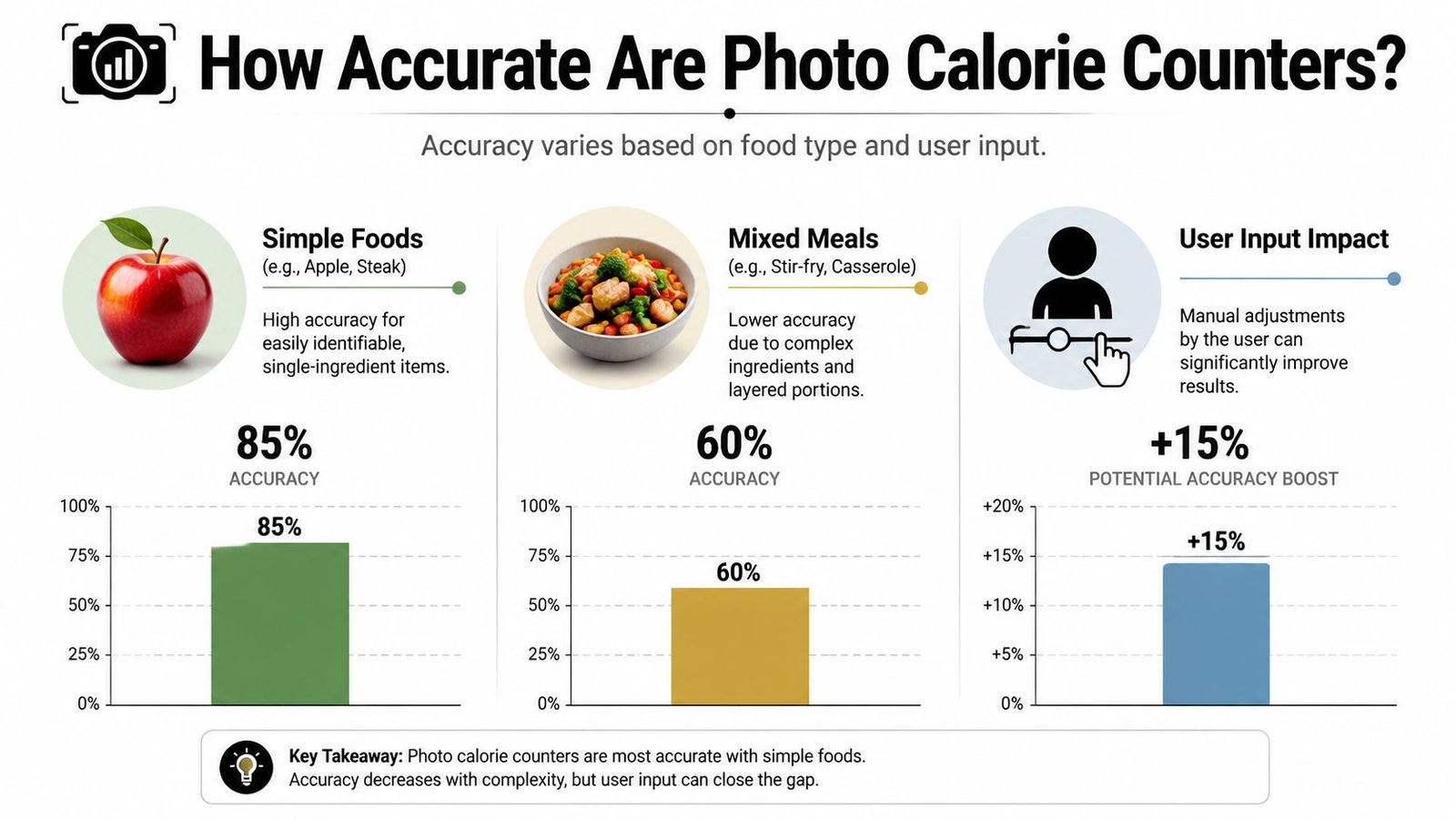
This step is easier when foods are visually distinct. A plain apple is simple. A stir-fry with sauce, chopped vegetables, and mixed proteins is much harder. The AI has to separate one item from another before it can estimate anything useful.
If you're curious how AI systems improve messy or low-quality visuals in other image tasks, this explanation of Image restoration with AI is a helpful side read. It's not about food tracking specifically, but it makes the image-processing side much easier to understand.
Step two is portion estimation
The process becomes complicated. Recognizing a food is one challenge. Estimating how much of it is on the plate is another.
A phone photo is flat. Real food is not. A mound of rice can look small or large depending on angle, lighting, plate size, and what's sitting next to it. The app has to infer volume from visual clues.
Here's a simple example:
- You photograph toast with peanut butter.
- The app recognizes toast correctly.
- It recognizes peanut butter correctly.
- It still has to guess whether that spread is thin, moderate, or heavy.
That final guess can change the nutrition result more than the food label itself.
Step three is database lookup
Once the app decides what the food is and how much is there, it matches those items to a nutrition database. That database turns “chicken breast” plus an estimated portion into calories, protein, fat, and carbs.
Step four is the editable result
The best way to think about the final output is this:
Practical rule: Treat the app's result as a strong first draft, not a final verdict.
If the app says “rice” but it's quinoa, you correct it. If it underestimates avocado, you nudge the portion up. The smoother that edit process feels, the better the app is in daily use.
A photo calorie counter isn't one big guess. It's several smaller guesses. Once you understand that pipeline, the strengths and weaknesses make a lot more sense.
The Truth About Photo Counter Accuracy
Many wonder the same thing right away. Does this stuff work?
The honest answer is yes, but not evenly across every part of the job. Photo counters are better at identifying foods than they are at estimating portions. That gap matters because calorie tracking depends on both.
Peer-reviewed research summarized by Fitia's review of AI calorie photo app accuracy reports that food identification accuracy ranges from 68% to 86%, while portion-size estimation can drop as low as 39%. For simple meals, final calorie estimates typically land within 15% to 30% of the true value.
Why recognition is easier than calorie math
A banana looks like a banana. A chicken breast usually still looks like chicken. Computer vision has become pretty good at visual categorization.
Portion size is a different beast. A photo doesn't tell the app weight directly. It has to infer volume from perspective, shadows, plate size, food shape, and context. That's why a meal can be “correctly recognized” but still logged poorly.
Think about two bowls of pasta. From above, they may look similar. One might be lightly filled, the other packed densely and coated in oil. To your eye, they seem close. To your calorie target, they might not be close at all.
The meals that cause the most trouble
The easiest meals for a photo calorie counter are simple, separated foods. Grilled salmon, potatoes, and green beans on a plate. Apple slices next to yogurt. A basic sandwich cut in half.
The hardest meals usually share a few traits:
- Ingredients are layered: Lasagna, casseroles, burrito bowls, curries.
- Sauces hide details: Dressings, oils, creamy toppings, glazes.
- Portions blend together: Rice under meat, vegetables mixed into noodles, melted cheese over everything.
- Preparation changes density: Fried versus steamed, lean versus fatty cuts, heavy oil versus minimal oil.
That last point trips up many users. A camera can't easily see how much oil soaked into pan-fried vegetables or whether a soup is broth-based or cream-heavy.
A useful way to judge the estimate
Don't ask, “Is this exact?” Ask, “Is this good enough for the decision I'm making?”
If you're trying to build awareness, create a calorie deficit, or keep protein intake more consistent, a close estimate can still be valuable. If you need very high precision, you'll probably want a more controlled method. For readers who want that more exact route, a food calorie scale guide is the right companion.
If your lunch is a plain turkey sandwich and fruit, the app has a fair shot. If it's a mixed restaurant noodle dish with sauce and hidden oil, expect rougher math.
That doesn't make photo tracking useless. It just means you should know where the weak spot is. It's not usually “What is this food?” It's “How much of it is really there?”
Photo Logging vs Manual Tracking Which Is Better
The true trade-off comes into play: Manual logging usually wins on precision. Photo logging usually wins on speed. Which one is better depends on what tends to make you stop.
Research summarized in this PMC review of image-based dietary assessment notes that manual database entry offers about 94% accuracy, while the 12% to 15% variance in AI photo counters is considered clinically acceptable for weight loss outcomes. The same review reports that logging consistency improved by 90% when using photo tracking versus manual entry, and that consistency correlates more strongly with weight loss success than precision.
The trade-off in one table
| Attribute | Photo Calorie Counter | Manual Logging (with scale) |
|---|---|---|
| Speed | Fast. Usually a quick snap and review | Slower. Search, weigh, select entries |
| Precision | Good enough for many goals, but estimate-based | Higher precision when foods are weighed |
| Daily consistency | Easier to maintain when life gets busy | Easier to abandon when meals get complicated |
| Learning value | Helps you log without much friction | Teaches portions and ingredients more directly |
| Best use case | Busy days, restaurant meals, habit building | Meal prep, cooking at home, high-precision targets |
Who should lean toward photo logging
Photo logging makes sense if you know your biggest issue is follow-through. You mean to log meals, but the app becomes a chore. In that case, “good enough and done” may beat “perfect and skipped.”
It's especially useful for:
- Beginners: People who need a habit before they need precision
- Busy professionals: Lunch breaks aren't long enough for a mini data-entry session
- Parents and caregivers: Family meals don't leave much room for weighing each ingredient
- Restaurant eaters: You often don't know exact ingredients anyway
Who should lean toward manual logging
Manual entry still has a strong place.
If you meal prep, use a kitchen scale, and want tighter control over calories and macros, manual logging is the better tool. It also helps when you cook recipes with ingredients that a camera can't reliably infer, like oils, sauces, and small add-ons.
The best tracking method isn't the most advanced one. It's the one you'll still use on a rushed Thursday.
For many people, the smartest approach is hybrid. Use photo logging when speed matters. Use manual logging when precision matters. That doesn't sound glamorous, but it matches real life better than trying to force one method onto every meal.
Practical Tips for More Accurate Estimates
A photo calorie counter works better when you help it out. You don't need to become a food photographer. Small habits can make the app's guesses much more useful.
State-of-the-art systems that use depth-based 3D portion estimation can reach ±1.2% Mean Absolute Percentage Error, while models relying on standard 2D images can show errors from ±8.9% to ±36%, according to AI Food Tracker's accuracy review. The big takeaway isn't that your phone suddenly becomes a lab instrument. It's that visual quality and angle matter a lot.
Make the plate easy to read
If foods are piled into one messy heap, the app has to guess where one item ends and another begins. That's hard for software and hard for humans.
Try this instead:
- Separate items when possible: Rice beside chicken beats rice under chicken.
- Keep toppings visible: Don't bury avocado, nuts, or cheese if you want a better estimate.
- Avoid cluttered backgrounds: A clean table helps the food stand out.
Take a cleaner photo
The camera angle changes portion perception. So does lighting.
A few habits help immediately:
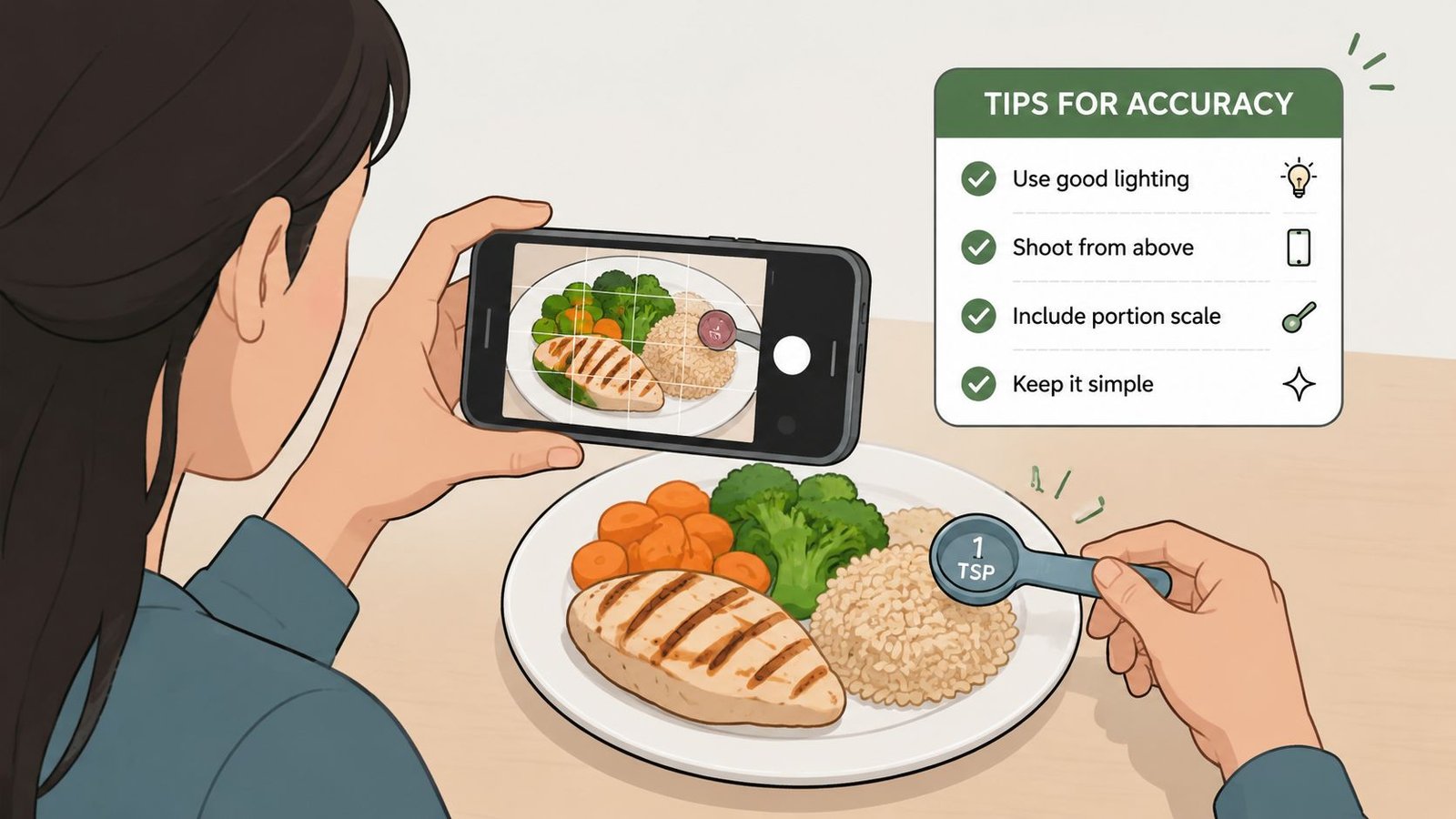
- Shoot from above or slightly above. Extreme side angles distort size.
- Use decent light. Shadows can make portions look smaller or hide textures.
- Include a familiar object when useful. A fork or spoon can give the app extra scale clues.
- Get the whole plate in frame. Cropped edges confuse portion estimation.
For a more detailed walkthrough, this guide on how to photograph your plate for accurate macro logs gives practical examples.
Edit the result before you accept it
This is the step many people skip. It's also the one that often matters most.
If the app identifies “chicken” correctly but misses the sauce, add the sauce. If it labels your portion as small and you know it was generous, adjust it. That quick review turns the app from a guessing machine into a useful assistant.
A better workflow is snap, scan, correct, log.
The photo gets you close fast. Your review gets you closer.
Know when not to trust the camera alone
Some foods are naturally bad candidates for image-only tracking. Smoothies, soups, heavily dressed salads, and mixed casseroles often hide too much information. When one of those meals matters to your plan, use manual edits, barcode scans, recipe entries, or a kitchen scale.
The best users of photo counters aren't passive. They work with the tool.
What to Look For in a Photo Counter App
Once you've decided the speed-versus-precision trade-off makes sense for you, the next challenge is picking an app that doesn't make daily logging annoying.
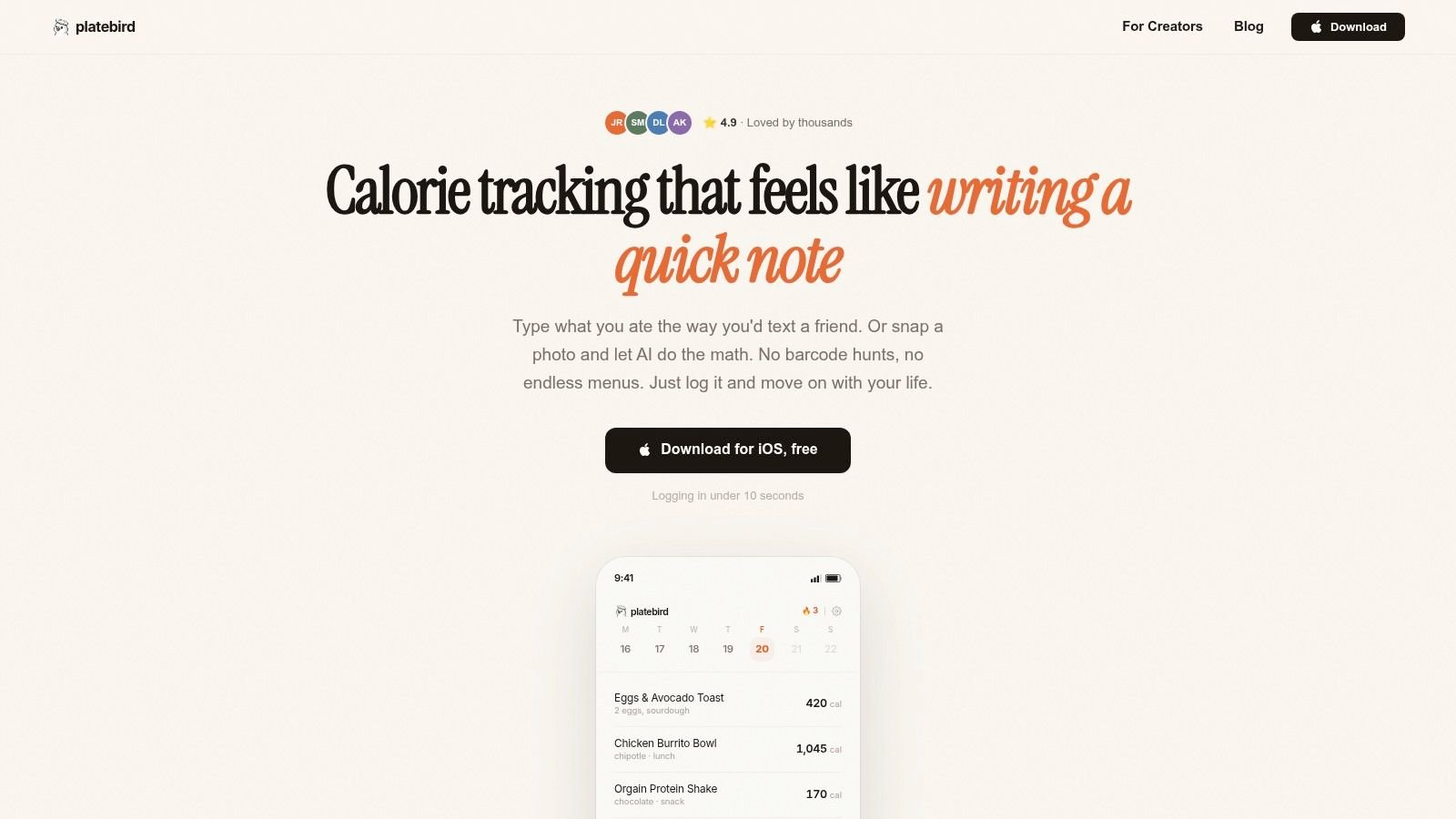
The first thing to judge isn't the marketing. It's the workflow. Can you open the app, snap a photo, make a quick correction, and move on? If the interface feels clunky during meal one, it'll feel unbearable by week two.
The features that actually matter
A lot of calorie apps advertise broad capabilities. The useful ones tend to stand out in more practical ways.
- Fast capture: The camera should open quickly and the result should appear without a maze of taps.
- Easy correction flow: You need to be able to change food names, portions, and add missing ingredients without friction.
- Reliable food database: Recognition is only half the job. The nutrition library behind it matters too.
- Multiple input options: Photo is helpful, but text logging and barcode scanning can save you when the camera struggles.
- Clear macro display: If protein is a priority, you should see it immediately.
Don't ignore privacy
Food apps can collect a surprising amount of personal information. Before you settle on one, check what it asks for upfront and what it stores over time.
A few questions are worth asking:
- Do you need an account before trying it?
- Can you use core features without handing over lots of personal data?
- Is the privacy policy readable, or buried under vague language?
For many people, ease of use and privacy belong in the same conversation. A fast app that also respects your comfort level tends to be one you'll keep using.
Test the app with your real meals
Don't evaluate a photo calorie counter with ideal demo food. Test it on what you eat. If your week includes oatmeal, takeout sushi, protein shakes, family pasta, and meal-prep chicken bowls, those are the meals that should decide the winner.
You can also compare how different approaches feel in practice by looking at this roundup of the best app for calorie counting. It's a useful way to think beyond features and focus on fit.
A quick product demo can also help you judge whether the logging flow feels natural in daily life:
Choose the app that makes logging easiest on your busiest day, not the app that looks smartest in a perfect demo.
The right app isn't necessarily the one promising the most intelligence. It's the one that helps you stay honest, stay consistent, and stay moving toward your goal.
If you want a simple place to start, PlateBird is built around the idea that calorie tracking should feel quick enough to keep doing. You can log by text or photo, get calories and macros fast, and start without creating an account. If you've bounced off calorie apps before because they took too much effort, that lighter workflow is worth trying.